Cat ET 2017C (caterpillar Electronic Technician) is an updated version
of the dealer level program for the diagnosis of all equipment
caterpillar.
This program works with the dealer diagnostic scanner caterpillar
Communication Adapter, as well as other adapters for diagnostics
including scanner Nexiq; the program provides the full information when
troubleshooting.
This diagnostic tool Cat ET
allows service technicians to reprogram ECMs, reconfigure control
system parameters, fine-tune performance or diagnose the cause of
failure for the first time. These powerful tools allow service personnel
to display and analyze vital performance and health information from
any system quickly and accurately.
When you purchase a program Cat ET (Cat Electronic Technician) 2017С,
you get detailed and clear instructions on how to activate it. But if
you have difficulties or questions concerning the installation, we are
helping you to enable the software remotely via TeamViewer free of
charge, without any additional fees.
We recommend using only Heavy Duty Truck diagnostic Scanner genuine caterpillar comm III
Heavy Duty Diagnostic Cat ET diagnostic app allows you to:
View active and logged diagnostics.
View events where irregularities occurred and were logged by the ECM.
View the status of a group of parameters (temperatures, pressures, etc.) simultaneously.
Record and log performance data.
Graph a group of status parameters.
View the current configuration of an ECM.
Change ECM configurations.
Perform diagnostic tests.
Perform calibrations.
Print reports and diagnostic results.
Please keep in mind that some ECM settings, for example, speed limit
requires factory password. The factory password generator not included
in this application
What’s New – cat Electronic Technician 2017C
Preferences Option to Save a Product Status Report to PDF
The OBD2 vehicle diagnostics Preferences dialog for the Product Status
Report has changed. The dialog contains a new checkbox to automatically
save a Product Status Report as a PDF file when the report is created.
The service tool will continue to automatically save Product Status
Reports as an XML file.
2019年8月6日星期二

2019年7月23日星期二
Injector Solenoid Test using Caterpillar ET Software
How to perform: Injector Solenoid Test using ET Software (CAT Engine)?
The purpose of the injector solenoid test is to diagnose injector wiring and injector solenoid functionality.
-Connect Caterpillar ET to your Laptop,
-Open Menu: “Diagnostics – Diagnostic Test – Injector Solenoid Test”
Example: CAT Engine – C11

NOTE: Injector Solenoid Test cannot be performed while the engine is running.
-Click “Power All” and wait the process until complete (Mode: powered), from Cylinder 1 to Cylinder 6.
-On Menu “Test Results”, all the results are OK, indicates that Solenoid Injector still on good condition.

NOTE:
-This test identifies an open circuit or a short circuit in the circuit for the injector solenoids. The test activates the injector solenoids one at a time while the engine is not running. A good solenoid will create an audible click when the solenoid is activated. Cat ET indicates the status of the solenoid as “OK”, “Open”, or “Short”.
The purpose of the injector solenoid test is to diagnose injector wiring and injector solenoid functionality.
-Connect Caterpillar ET to your Laptop,
-Open Menu: “Diagnostics – Diagnostic Test – Injector Solenoid Test”
Example: CAT Engine – C11
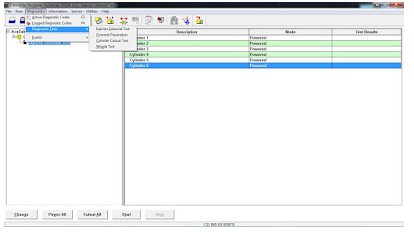
NOTE: Injector Solenoid Test cannot be performed while the engine is running.
-Click “Power All” and wait the process until complete (Mode: powered), from Cylinder 1 to Cylinder 6.
-On Menu “Test Results”, all the results are OK, indicates that Solenoid Injector still on good condition.
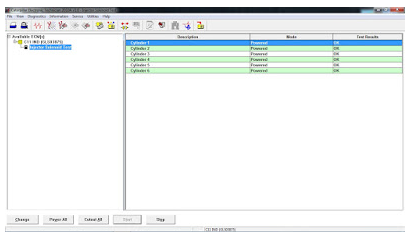
NOTE:
-This test identifies an open circuit or a short circuit in the circuit for the injector solenoids. The test activates the injector solenoids one at a time while the engine is not running. A good solenoid will create an audible click when the solenoid is activated. Cat ET indicates the status of the solenoid as “OK”, “Open”, or “Short”.
2019年7月16日星期二
How to Connect Caterpillar ET Software from your Laptop to ECM
How to Connect Caterpillar ET Software from your Laptop to ECM?
-Open Caterpillar ET Software, it will automatically connect to ECM, Click “Stop Connect”.

-Click on Menu: “Utilities – Preferences”.

-If using Caterpillar Comm Adapter 3, and Mark on “Enable Dual Data Link Service”.

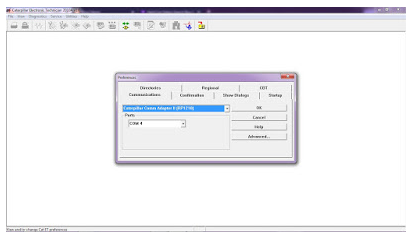
-If using Caterpillar Comm Adapter II, and setting “Ports” (example: COM4) as your COM port at Device Manager.

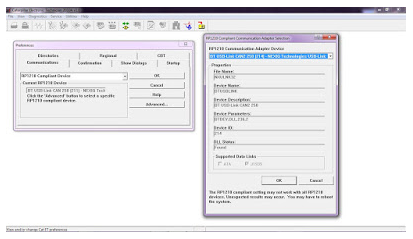
-If using NEXIQ USB-Link, Choose “RP1210 Compliant Device”, also Click Advanced button to select a specific RP1210.

-Open Caterpillar ET Software, it will automatically connect to ECM, Click “Stop Connect”.
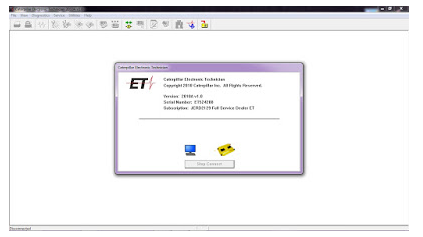
-Click on Menu: “Utilities – Preferences”.
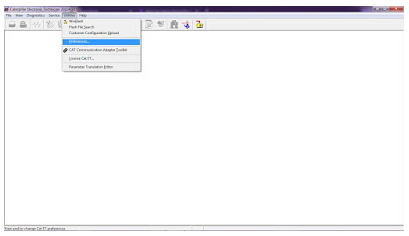
-If using Caterpillar Comm Adapter 3, and Mark on “Enable Dual Data Link Service”.
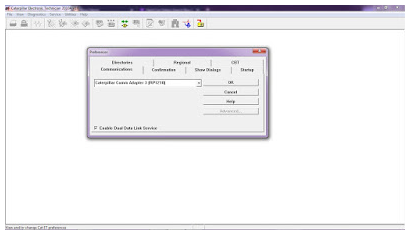
-If using Caterpillar Comm Adapter II, and setting “Ports” (example: COM4) as your COM port at Device Manager.
-If using NEXIQ USB-Link, Choose “RP1210 Compliant Device”, also Click Advanced button to select a specific RP1210.
2019年7月3日星期三
Electronic Service Tool diagnostic interface Master for JCB
Electronic Service Tool for JCB can be used for fast and effective
fault finding, check maintenance standards, see if the machine has been
abused, view and change machine set up data, flash ECUs with the
correct data files. You can reset EMS hours, edit speed limiters and use
other functions what require special unlock.
Electronic Service Tool diagnostic interface for JCB
Software Version: V8.1.0
System requirement: XP
Language: English, French, German, Italian, Portuguese, Spanish
Supported models and engines: JS Range, JZ70, BackHoe Loader, Loadall 2007-, Loadall 2007+, Robot, Teletruk, Midi Excavator, Dump Truck, Fastrac 2000-3000 Series, Fastrac 8250 Series 1, Fastrac 8250 Series 2, Fastrac 7000 Series 1, Large Wheel Loading Shovels, Vibromax, JCB Dieselmax Engine, JCB Engine (IPU OEM), JCB Engine (Base Engine OEM), JCB Generators, LiveLink.
The Heavy Duty Diagnostic JCB Service Master also provides several key features that will accompany all JCB projects, a Multi Language editing tool that provides a means of individual text string translation for all JCB Applications and a means to select a localized language translation for the each JCB Application.
What can you do with this JCB Electronic Service Tool?
Service Master – used for fast and effective fault finding, check maintenance standards, see if the machine has been abused, view and change machine set up data, flash ECUs with the correct data files. You can reset EMS hours, edit speed limiters and use other functions what require special unlock.
Package List:
1 x Electronic Service Tool Interface for JCB
1 x 9Pin and 6Pin cable
1 x USB cable
1 x Software CD
Electronic Service Tool diagnostic interface for JCB
Software Version: V8.1.0
System requirement: XP
Language: English, French, German, Italian, Portuguese, Spanish
Supported models and engines: JS Range, JZ70, BackHoe Loader, Loadall 2007-, Loadall 2007+, Robot, Teletruk, Midi Excavator, Dump Truck, Fastrac 2000-3000 Series, Fastrac 8250 Series 1, Fastrac 8250 Series 2, Fastrac 7000 Series 1, Large Wheel Loading Shovels, Vibromax, JCB Dieselmax Engine, JCB Engine (IPU OEM), JCB Engine (Base Engine OEM), JCB Generators, LiveLink.
The Heavy Duty Diagnostic JCB Service Master also provides several key features that will accompany all JCB projects, a Multi Language editing tool that provides a means of individual text string translation for all JCB Applications and a means to select a localized language translation for the each JCB Application.
What can you do with this JCB Electronic Service Tool?
Service Master – used for fast and effective fault finding, check maintenance standards, see if the machine has been abused, view and change machine set up data, flash ECUs with the correct data files. You can reset EMS hours, edit speed limiters and use other functions what require special unlock.
Package List:
1 x Electronic Service Tool Interface for JCB
1 x 9Pin and 6Pin cable
1 x USB cable
1 x Software CD
2019年6月25日星期二
WIFI CAT ET III Adapter Caterpillar ET3 New Arrival
The old bluetooth cat et adatper iii has stopped production, and
you can get the new WIFI CAT Caterpillar ET Diagnostic Tool adapter to
replace it, VOBDII.COM has WIFI CAT ET III Adapter Caterpillar ET3 New
Arrival.
WIFI Caterpillar ET3 Adapter III 317-7485 CAT ET III Diagnostic
CAT Communications Adapter III 317-7485 would be the newest generation of the CAT Communication Adapter group, and replaces the CAT Comm Adapter II.This function is required for some CAT ET (Electronic Technician) functions.
Real 2015A Auto Scanner Tools Caterpillar ET3 Adapter III P/N 317-7485 Professional Diagnostic Adapter for CAT with WIFI
This can be the only recommended communication device for Auto Repair Computer software CAT, as well as the only datalink device that may enable you to properly communicate with a CAT engine on dual datalinks.
Application version: 2015A
2015A Caterpillar ET3 Adapter III Communication:
1. Permits communication amongst service tools and engine controls utilizing numerous data links just like J1939/11, DeviceNet (future release), CAT DataLink, and J1708 (ATA) vehicle networks;
2. Flash program allows adapter firmware upgrades as more functions develop into available;
3. Makes use of J1939/11, high-speed information link (a part of ADEM III controls), substantially minimizing flash times;
4. Automatically selects J1939/11 when flashing the engine (reduces the flash time around 80%, from 14 minutes to 3 minutes).
For anyone who is interested in wireless diagnostic interface for cat engines, please you may decide on this new WIFI CAT Caterpillar ET Diagnostic Tool III adapter from www.autonumen.com , and also you will get 5% off discount in the event you order it now.
WIFI Caterpillar ET3 Adapter III 317-7485 CAT ET III Diagnostic
CAT Communications Adapter III 317-7485 would be the newest generation of the CAT Communication Adapter group, and replaces the CAT Comm Adapter II.This function is required for some CAT ET (Electronic Technician) functions.
Real 2015A Auto Scanner Tools Caterpillar ET3 Adapter III P/N 317-7485 Professional Diagnostic Adapter for CAT with WIFI
This can be the only recommended communication device for Auto Repair Computer software CAT, as well as the only datalink device that may enable you to properly communicate with a CAT engine on dual datalinks.
Application version: 2015A
2015A Caterpillar ET3 Adapter III Communication:
1. Permits communication amongst service tools and engine controls utilizing numerous data links just like J1939/11, DeviceNet (future release), CAT DataLink, and J1708 (ATA) vehicle networks;
2. Flash program allows adapter firmware upgrades as more functions develop into available;
3. Makes use of J1939/11, high-speed information link (a part of ADEM III controls), substantially minimizing flash times;
4. Automatically selects J1939/11 when flashing the engine (reduces the flash time around 80%, from 14 minutes to 3 minutes).
For anyone who is interested in wireless diagnostic interface for cat engines, please you may decide on this new WIFI CAT Caterpillar ET Diagnostic Tool III adapter from www.autonumen.com , and also you will get 5% off discount in the event you order it now.
2019年6月18日星期二
CAT Caterpillar ET is really a exceptional obd2 solution
As a excellent obd2 solutions,CAT Caterpillar ET Diagnostic Adapter
features a potent function.it not just can Show “Logged Occasion Codes”
to show engine more than speeds,Higher temperatures, fuel consumption
but also can view ECM’s existing configuration and adjust user
settings,perform diagnostic tests and calibrations, and
calibrate.Electro-mechanical and electro-hydraulic elements .
Is the Cat Comm III compatable using the computer software CAT Caterpillar ET 2011B Is this an actual caterpillar portion or even a knock off? Thanks.Yes, this is really the genuine CAT adapter, It’s also the ONLY advisable adapter for CAT ET, but obviously other ones will perform. It will function fine for the version you may have, and 2011C is actually the newest version.
What exactly is the distinction between a cat comm II & Cat Comm III. Is one just a usb connection and one serial? Also, will this unit perform with my Cat 3126B marine units? Seriel no. 3GS01797 Thanks. CAT Comm II was a serial port model, but since computers are no longer made with serial ports, they changed the design to a USB and called it a CAT Comm III. So you are correct. This unit works with all CAT engines – Marine, on-highway, and off-highway. On Marine units, I’m not sure where they put the plug, but it should be somewhere near the ECM (Typically). It should be either a 6 pin or 9 pin connector.
Does this operate with CAT 3500 natural gas engines and 3600 natural gas engines? Thanks.If those Professional Diagnostic Tools use CAT Electronic Technician (CAT ET) for the application, it’s going to perform. Can the cat communicate 3 also be used to read detroit and cummins engines if I have the correct software? Yes, it reads both J1708 and J1939 so it can read both of those. Keep in mind that this adapter only comes with the J1939 adapter end, so I would recommend purchasing the J1708 adapter end from me as well if you plan on connecting to some older stuff.
More similar items can be found on www.autonumen.com and any problem please feel free contact us.
Is the Cat Comm III compatable using the computer software CAT Caterpillar ET 2011B Is this an actual caterpillar portion or even a knock off? Thanks.Yes, this is really the genuine CAT adapter, It’s also the ONLY advisable adapter for CAT ET, but obviously other ones will perform. It will function fine for the version you may have, and 2011C is actually the newest version.
What exactly is the distinction between a cat comm II & Cat Comm III. Is one just a usb connection and one serial? Also, will this unit perform with my Cat 3126B marine units? Seriel no. 3GS01797 Thanks. CAT Comm II was a serial port model, but since computers are no longer made with serial ports, they changed the design to a USB and called it a CAT Comm III. So you are correct. This unit works with all CAT engines – Marine, on-highway, and off-highway. On Marine units, I’m not sure where they put the plug, but it should be somewhere near the ECM (Typically). It should be either a 6 pin or 9 pin connector.
Does this operate with CAT 3500 natural gas engines and 3600 natural gas engines? Thanks.If those Professional Diagnostic Tools use CAT Electronic Technician (CAT ET) for the application, it’s going to perform. Can the cat communicate 3 also be used to read detroit and cummins engines if I have the correct software? Yes, it reads both J1708 and J1939 so it can read both of those. Keep in mind that this adapter only comes with the J1939 adapter end, so I would recommend purchasing the J1708 adapter end from me as well if you plan on connecting to some older stuff.
More similar items can be found on www.autonumen.com and any problem please feel free contact us.
2019年5月14日星期二
2015A CAT ET 3 CAT Caterpillar ET diagnostic cat et III Functions
Real 2015A Caterpillar ET3 Adapter III P/N 317-7485 Professional
Diagnostic Adapter for CAT with WIFI.CAT Caterpillar ET Diagnostic
Adapter display status of all parameters, such as engine speed, Throttle
position, timing advance, fuel flow, etc.CAT Caterpillar ET Wireless
Diagnostic Adapter V2015 CAT Caterpillar ET III Diagnostic tool retrieve engine totals for fuel used, miles traveled, and hours Operated.

2015A Wifi Cat Caterpillar ET adapter iii functions:
1. Allows communication between service tools and engine controls using various data links such as J1939/11, DeviceNet (future release), CAT DataLink, and J1708 (ATA) vehicle networks;
2. Flash program allows adapter firmware upgrades as additional features become available;
3. Uses J1939/11, high-speed data link (part of ADEM III controls), substantially reducing flash times;
4. Automatically selects J1939/11 when flashing the engine (reduces the flash time approximately 80%, from 14 minutes to 3 minutes).
Software Version: Caterpillar et 2015a (Package with no 2015A cat et key generator, customers need send information for factory to activation, thanks!!)

Operating System: Designed to run with Microsoft Windows XP or windows7 32bits
Recommended Configurations:
PC containing a 2.0 GHz dual-core processor
3GB RAM
3GB of available hard disk drive
DVD-ROM drive
15.4 inch XGA Screen (1280×1024 compatible)
Microsoft Windows™ 7 Professional
RS232 port with 16550AF UART or compatible (for use with Comm Adapter II)

USB 1.1 or 2.0 port (for use with Comm Adapter 3)
Ethernet RJ45 connector
Built in pointing device or mouse
For security purposes, Microsoft Internet Explorer version 9 or newer is recommended.
Note: The most recent version of Microsoft Internet Explorer may not be validated to work with the service tool.
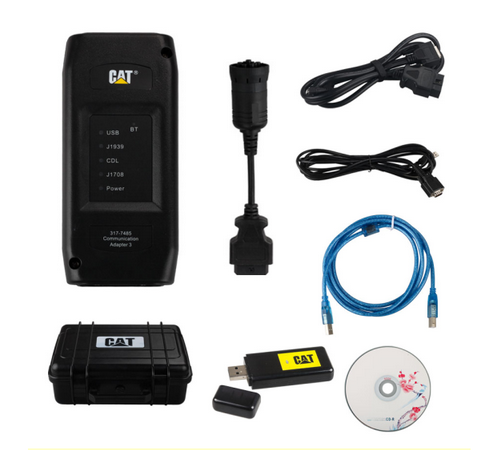
CAT ET III Wireless Adapter 3 PCB Board Display:

Focus On OBD Tool Since 2008
Wechat/WhatsApp:(+86)15815514521
Email:service@autonumen.com
Website:www.autonumen.com
2015A Wifi Cat Caterpillar ET adapter iii functions:
1. Allows communication between service tools and engine controls using various data links such as J1939/11, DeviceNet (future release), CAT DataLink, and J1708 (ATA) vehicle networks;
2. Flash program allows adapter firmware upgrades as additional features become available;
3. Uses J1939/11, high-speed data link (part of ADEM III controls), substantially reducing flash times;
4. Automatically selects J1939/11 when flashing the engine (reduces the flash time approximately 80%, from 14 minutes to 3 minutes).
Software Version: Caterpillar et 2015a (Package with no 2015A cat et key generator, customers need send information for factory to activation, thanks!!)
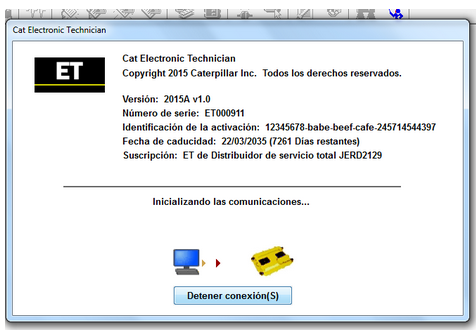
Operating System: Designed to run with Microsoft Windows XP or windows7 32bits
Recommended Configurations:
PC containing a 2.0 GHz dual-core processor
3GB RAM
3GB of available hard disk drive
DVD-ROM drive
15.4 inch XGA Screen (1280×1024 compatible)
Microsoft Windows™ 7 Professional
RS232 port with 16550AF UART or compatible (for use with Comm Adapter II)
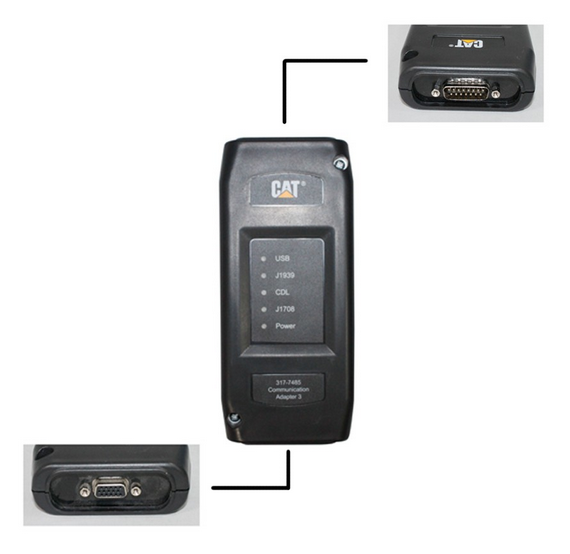
USB 1.1 or 2.0 port (for use with Comm Adapter 3)
Ethernet RJ45 connector
Built in pointing device or mouse
For security purposes, Microsoft Internet Explorer version 9 or newer is recommended.
Note: The most recent version of Microsoft Internet Explorer may not be validated to work with the service tool.
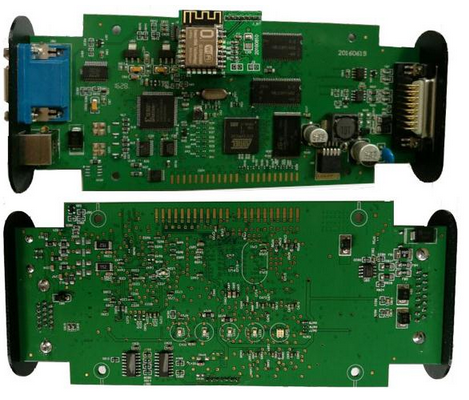
CAT ET III Wireless Adapter 3 PCB Board Display:
Focus On OBD Tool Since 2008
Wechat/WhatsApp:(+86)15815514521
Email:service@autonumen.com
Website:www.autonumen.com
2019年5月7日星期二
caterpillar ET 2017C Diagnostic Software
Cat ET 2017C (caterpillar Electronic Technician) is an updated
version of the dealer level program for the diagnosis of all equipment
caterpillar.
This program works with the dealer diagnostic scanner caterpillar Communication Adapter, as well as other adapters for diagnostics including scanner Nexiq; the program provides the full information when troubleshooting.
This diagnostic tool Cat ET allows service technicians to reprogram ECMs, reconfigure control system parameters, fine-tune performance or diagnose the cause of failure for the first time. These powerful tools allow service personnel to display and analyze vital performance and health information from any system quickly and accurately.
When you purchase a program Cat ET (Cat Electronic Technician) 2017С, you get detailed and clear instructions on how to activate it. But if you have difficulties or questions concerning the installation, we are helping you to enable the software remotely via TeamViewer free of charge, without any additional fees.
We recommend using onlyHeavy Duty Truck diagnostic Scannergenuine caterpillar comm III
Cat ET diagnostic app allows you to:
View active and logged diagnostics.
View events where irregularities occurred and were logged by the ECM.
View the status of a group of parameters (temperatures, pressures, etc.) simultaneously.
Record and log performance data.
Graph a group of status parameters.
View the current configuration of an ECM.
Change ECM configurations.
Perform diagnostic tests.
Perform calibrations.
Print reports and diagnostic results.
Please keep in mind that some ECM settings, for example, speed limit requires factory password. The factory password generator not included in this application
What’s New – cat Electronic Technician 2017C
Preferences Option to Save a Product Status Report to PDF
The OBD2 vehicle diagnostics Preferences dialog for the Product Status Report has changed. The dialog contains a new checkbox to automatically save a Product Status Report as a PDF file when the report is created. The service tool will continue to automatically save Product Status Reports as an XML file.
This program works with the dealer diagnostic scanner caterpillar Communication Adapter, as well as other adapters for diagnostics including scanner Nexiq; the program provides the full information when troubleshooting.
This diagnostic tool Cat ET allows service technicians to reprogram ECMs, reconfigure control system parameters, fine-tune performance or diagnose the cause of failure for the first time. These powerful tools allow service personnel to display and analyze vital performance and health information from any system quickly and accurately.
When you purchase a program Cat ET (Cat Electronic Technician) 2017С, you get detailed and clear instructions on how to activate it. But if you have difficulties or questions concerning the installation, we are helping you to enable the software remotely via TeamViewer free of charge, without any additional fees.
We recommend using onlyHeavy Duty Truck diagnostic Scannergenuine caterpillar comm III
Cat ET diagnostic app allows you to:
View active and logged diagnostics.
View events where irregularities occurred and were logged by the ECM.
View the status of a group of parameters (temperatures, pressures, etc.) simultaneously.
Record and log performance data.
Graph a group of status parameters.
View the current configuration of an ECM.
Change ECM configurations.
Perform diagnostic tests.
Perform calibrations.
Print reports and diagnostic results.
Please keep in mind that some ECM settings, for example, speed limit requires factory password. The factory password generator not included in this application
What’s New – cat Electronic Technician 2017C
Preferences Option to Save a Product Status Report to PDF
The OBD2 vehicle diagnostics Preferences dialog for the Product Status Report has changed. The dialog contains a new checkbox to automatically save a Product Status Report as a PDF file when the report is created. The service tool will continue to automatically save Product Status Reports as an XML file.
2019年4月23日星期二
CAT ET III WIFI Diagnostic Scanner Caterpillar ET3 Adapter III 317-7485
CAT ET III WIFI Caterpillar ET3 Adapter III 317-7485 Diagnostic Scanner
CAT Communications Adapter III 317-7485 is the latest generation of the CAT Communication Adapter group, and replaces the CAT Comm Adapter II.This function is needed for some CAT ET (Electronic Technician) functions.
Real 2015A Caterpillar ET3 Adapter III P/N 317-7485 Professional Diagnostic Adapter for CAT with WIFI
This is the only recommended communication device for CAT, and the only datalink device that will allow you to properly communicate with a CAT engine on dual datalinks.
2015A Caterpillar ET3 Adapter III Communication:
1. Allows communication between service tools and engine controls using various data links such as J1939/11, DeviceNet (future release), CAT DataLink, and J1708 (ATA) vehicle networks;
2. Flash program allows adapter firmware upgrades as additional features become available;
3. Uses J1939/11, high-speed data link (part of ADEM III controls), substantially reducing flash times;
4. Automatically selects J1939/11 when flashing the engine (reduces the flash time approximately 80%, from 14 minutes to 3 minutes).
CAT Communications Adapter III 317-7485 is the latest generation of the CAT Communication Adapter group, and replaces the CAT Comm Adapter II.This function is needed for some CAT ET (Electronic Technician) functions.
Real 2015A Caterpillar ET3 Adapter III P/N 317-7485 Professional Diagnostic Adapter for CAT with WIFI
This is the only recommended communication device for CAT, and the only datalink device that will allow you to properly communicate with a CAT engine on dual datalinks.
2015A Caterpillar ET3 Adapter III Communication:
1. Allows communication between service tools and engine controls using various data links such as J1939/11, DeviceNet (future release), CAT DataLink, and J1708 (ATA) vehicle networks;
2. Flash program allows adapter firmware upgrades as additional features become available;
3. Uses J1939/11, high-speed data link (part of ADEM III controls), substantially reducing flash times;
4. Automatically selects J1939/11 when flashing the engine (reduces the flash time approximately 80%, from 14 minutes to 3 minutes).
2019年4月9日星期二
Best Quality CAT Caterpillar ET Diagnostic Adapter III
2017A Version CAT Caterpillar ET Diagnostic Adapter III PLUS DELLd630 laptop (Real Caterpillar ET3 Adapter III)
we will install the software before ship, so you can get it work directly after you receive it.
2017A Cat ET software as Cat Caterpillar ET 2015A Software update version, 2017A Caterpillar Electronic Technician softwarer With Autel Tool CAT ET 3 Cat caterpillar adapter 3 support caterpillar diagnostic till 2017.
Cat et Caterpillar Electronic Technician Software 2017A V1.0:
Type of catalogue: Caterpillar Electronic Technician Diagnostic Software
Make: Caterpillar
Region: WorldWide all region
Inclusive languages: English, Chinese, Danish, French, German, Italian, Japanese, Portuguese, Russian, Spanish
From Autonumen.com Caterpillar ET Software 2017A Function:
This diagnostic app allows you to:
View active and logged diagnostics.
View events where irregularities occurred and were logged by the ECM.
View the status of a group of parameters (temperatures, pressures, etc.) simultaneously.
Record and log performance data.
Graph a group of status parameters.
View the current configuration of an ECM.
Change ECM configurations.
Perform diagnostic tests.
Perform calibrations.
Print reports and diagnostic results.
Please keep in mind that some ecm settings for example, speed limit requires factory password. The factory password generator is not included in this application
Package :
1.Used Dell D630 laptop
2.Real CAT et3 Comm Adapter III(it’s best quality cat et 3,not adapter 2,please check Communication port)
3.USB Cable (From device to your computer)
4.J1939/J1708 Cable (from device to your truck)

we will install the software before ship, so you can get it work directly after you receive it.
2017A Cat ET software as Cat Caterpillar ET 2015A Software update version, 2017A Caterpillar Electronic Technician softwarer With Autel Tool CAT ET 3 Cat caterpillar adapter 3 support caterpillar diagnostic till 2017.
Cat et Caterpillar Electronic Technician Software 2017A V1.0:
Type of catalogue: Caterpillar Electronic Technician Diagnostic Software
Make: Caterpillar
Region: WorldWide all region
Inclusive languages: English, Chinese, Danish, French, German, Italian, Japanese, Portuguese, Russian, Spanish
From Autonumen.com Caterpillar ET Software 2017A Function:
This diagnostic app allows you to:
View active and logged diagnostics.
View events where irregularities occurred and were logged by the ECM.
View the status of a group of parameters (temperatures, pressures, etc.) simultaneously.
Record and log performance data.
Graph a group of status parameters.
View the current configuration of an ECM.
Change ECM configurations.
Perform diagnostic tests.
Perform calibrations.
Print reports and diagnostic results.
Please keep in mind that some ecm settings for example, speed limit requires factory password. The factory password generator is not included in this application
Package :
1.Used Dell D630 laptop
2.Real CAT et3 Comm Adapter III(it’s best quality cat et 3,not adapter 2,please check Communication port)
3.USB Cable (From device to your computer)
4.J1939/J1708 Cable (from device to your truck)

2019年3月25日星期一
WIFI CAT ET III Adapter Caterpillar ET3 New Arrival
The old bluetooth cat et adatper iii has stopped production,
and you may get the new WIFI CAT Caterpillar ET Diagnostic Interface
adapter to replace it, Autonumen.COM has WIFI CAT ET III Adapter Caterpillar ET3 New Arrival.
WIFI Caterpillar ET3 Adapter III 317-7485 CAT ET III Diagnostic
Car Diagnostic Tools CAT Communications Adapter III 317-7485 is the most current generation on the CAT Communication Adapter group, and replaces the CAT Comm Adapter II.This function is needed for some CAT ET (Electronic Technician) functions.
True 2015A Caterpillar ET3 Adapter III P/N 317-7485 Experienced Diagnostic Adapter for CAT from www.autonumen.com with WIFI
This can be the only encouraged communication device for Auto Repair Software CAT, and the only datalink device which will permit you to properly communicate having a CAT engine on dual datalinks.
Software version: 2015A
2015A Caterpillar ET3 Adapter III Communication:
1. Enables communication in between service tools and engine controls employing numerous data hyperlinks which include J1939/11, DeviceNet (future release), CAT DataLink, and J1708 (ATA) vehicle networks;
2. Flash plan permits adapter firmware upgrades as further features grow to be available;
3. Uses J1939/11, high-speed information link (a part of ADEM III controls), substantially lowering flash times;
4. Automatically selects J1939/11 when flashing the engine (reduces the flash time approximately 80%, from 14 minutes to three minutes).
WIFI Caterpillar ET3 Adapter III 317-7485 CAT ET III Diagnostic
Car Diagnostic Tools CAT Communications Adapter III 317-7485 is the most current generation on the CAT Communication Adapter group, and replaces the CAT Comm Adapter II.This function is needed for some CAT ET (Electronic Technician) functions.
True 2015A Caterpillar ET3 Adapter III P/N 317-7485 Experienced Diagnostic Adapter for CAT from www.autonumen.com with WIFI
This can be the only encouraged communication device for Auto Repair Software CAT, and the only datalink device which will permit you to properly communicate having a CAT engine on dual datalinks.
Software version: 2015A
2015A Caterpillar ET3 Adapter III Communication:
1. Enables communication in between service tools and engine controls employing numerous data hyperlinks which include J1939/11, DeviceNet (future release), CAT DataLink, and J1708 (ATA) vehicle networks;
2. Flash plan permits adapter firmware upgrades as further features grow to be available;
3. Uses J1939/11, high-speed information link (a part of ADEM III controls), substantially lowering flash times;
4. Automatically selects J1939/11 when flashing the engine (reduces the flash time approximately 80%, from 14 minutes to three minutes).
2019年3月12日星期二
Autel MaxiSys Pro MS908P Autel MS908 Pro
AUTEL MAXISYS Pro itself has already supported ECU programming function
for BENZ and BMW cars, if you need to get support for more car models,
you must use J2534 device along with OEM software to implement this
function. J2534 DEVICE can not only use with AUTEL MAXISYS Pro , but
also can work on other OEM software.

Using additional OEM software, the MaxiFlash Pro can be used as a Pass-Thru diagnostics tool as well, which allows users to read and clear Diagnostic Trouble Codes (DTCs) and data log PIDS, collect sensor data and log generic OBDII data etc.
AUTEL MaxiSYS Pro MS908P Software Advantage:
Open source Android Operating System for fast boot-up and multitasking
Easy and intuitive navigation makes finding what you need simple and fast
Displays live data in text, graph and analog for easy data review and analysis
Configure live data display options, set alarms, record, and playback data frames with one touch
Records and playbacks live data to pinpoint troubles of sensors and components
Cloud-based Data Manager saves customer and vehicle records, scanner data and technician notes
Remote technical support for convenient demonstration, training and increased customer satisfaction
Intelligent memory of vehicles for easy and quick diagnosis of tested vehicles
Prints out recorded data anytime and anywhere with Wi-Fi technology
Autel Scanner AUTEL MaxiSYS Pro MS908 Pro FAQ:
Q1:Can I use it to do gearbox programming of the Toyota MMT and Mitsubishi?
A1:Sorry, it can not.
Q2: Can I connect the MaxiSYS Pro MS908P with my car in other way? Such as
the bluetooth. Or I can only connect through the cable?
A1:The device include one Ipad with one diagnostic box. The diagnostic box
communicate with the Ipad by bluetooth. But diagnostic box need to connect cars by cable or connector.
Q3: Can I use the AUTEL MaxiSYS Pro MS908P to program the ECM module?
A3: Some cars can do. Some cars can not.
Q4: What is the difference between the AUTEL MaxiSys MS908 and the AUTEL
MaxiSYS Pro MS908P?
A4:AUTEL MaxiSYS Pro MS908P can do the programming function, while the
MS908 can not.

Using additional OEM software, the MaxiFlash Pro can be used as a Pass-Thru diagnostics tool as well, which allows users to read and clear Diagnostic Trouble Codes (DTCs) and data log PIDS, collect sensor data and log generic OBDII data etc.
AUTEL MaxiSYS Pro MS908P Software Advantage:
Open source Android Operating System for fast boot-up and multitasking
Easy and intuitive navigation makes finding what you need simple and fast
Displays live data in text, graph and analog for easy data review and analysis
Configure live data display options, set alarms, record, and playback data frames with one touch
Records and playbacks live data to pinpoint troubles of sensors and components
Cloud-based Data Manager saves customer and vehicle records, scanner data and technician notes
Remote technical support for convenient demonstration, training and increased customer satisfaction
Intelligent memory of vehicles for easy and quick diagnosis of tested vehicles
Prints out recorded data anytime and anywhere with Wi-Fi technology
Autel Scanner AUTEL MaxiSYS Pro MS908 Pro FAQ:
Q1:Can I use it to do gearbox programming of the Toyota MMT and Mitsubishi?
A1:Sorry, it can not.
Q2: Can I connect the MaxiSYS Pro MS908P with my car in other way? Such as
the bluetooth. Or I can only connect through the cable?
A1:The device include one Ipad with one diagnostic box. The diagnostic box
communicate with the Ipad by bluetooth. But diagnostic box need to connect cars by cable or connector.
Q3: Can I use the AUTEL MaxiSYS Pro MS908P to program the ECM module?
A3: Some cars can do. Some cars can not.
Q4: What is the difference between the AUTEL MaxiSys MS908 and the AUTEL
MaxiSYS Pro MS908P?
A4:AUTEL MaxiSYS Pro MS908P can do the programming function, while the
MS908 can not.
2019年2月21日星期四
WIFI CAT ET III Adapter Caterpillar ET3 New Arrival
The old bluetooth cat et adatper iii has stopped production,
and you can get the new WIFI CAT Caterpillar ET Diagnostic Tool adapter
to replace it, AUTONUMEN.COM has WIFI CAT ET III Adapter Caterpillar ET3
New Arrival.
WIFI Caterpillar ET3 Adapter III 317-7485 CAT ET III Diagnostic
CAT Communications Adapter III 317-7485 would be the newest generation of the CAT Communication Adapter group, and replaces the CAT Comm Adapter II.This function is required for some CAT ET (Electronic Technician) functions.
Real 2015A Auto Scanner Tools Caterpillar ET3 Adapter III P/N 317-7485 Professional Diagnostic Adapter for CAT with WIFI
This can be the only recommended communication device for Auto Repair Computer software CAT, as well as the only datalink device that may enable you to properly communicate with a CAT engine on dual datalinks.
Application version: 2015A
2015A Caterpillar ET3 Adapter III Communication:
1. Permits communication amongst service tools and engine controls utilizing numerous data links just like J1939/11, DeviceNet (future release), CAT DataLink, and J1708 (ATA) vehicle networks;
2. Flash program allows adapter firmware upgrades as more functions develop into available;
3. Makes use of J1939/11, high-speed information link (a part of ADEM III controls), substantially minimizing flash times;
4. Automatically selects J1939/11 when flashing the engine (reduces the flash time around 80%, from 14 minutes to 3 minutes).
For anyone who is interested in wireless diagnostic interface for cat engines, please you may decide on this new WIFI CAT Caterpillar ET Diagnostic Tool III adapter from www.autonumen.com , and also you will get 5% off discount in the event you order it now.
WIFI Caterpillar ET3 Adapter III 317-7485 CAT ET III Diagnostic
CAT Communications Adapter III 317-7485 would be the newest generation of the CAT Communication Adapter group, and replaces the CAT Comm Adapter II.This function is required for some CAT ET (Electronic Technician) functions.
Real 2015A Auto Scanner Tools Caterpillar ET3 Adapter III P/N 317-7485 Professional Diagnostic Adapter for CAT with WIFI
This can be the only recommended communication device for Auto Repair Computer software CAT, as well as the only datalink device that may enable you to properly communicate with a CAT engine on dual datalinks.
Application version: 2015A
2015A Caterpillar ET3 Adapter III Communication:
1. Permits communication amongst service tools and engine controls utilizing numerous data links just like J1939/11, DeviceNet (future release), CAT DataLink, and J1708 (ATA) vehicle networks;
2. Flash program allows adapter firmware upgrades as more functions develop into available;
3. Makes use of J1939/11, high-speed information link (a part of ADEM III controls), substantially minimizing flash times;
4. Automatically selects J1939/11 when flashing the engine (reduces the flash time around 80%, from 14 minutes to 3 minutes).
For anyone who is interested in wireless diagnostic interface for cat engines, please you may decide on this new WIFI CAT Caterpillar ET Diagnostic Tool III adapter from www.autonumen.com , and also you will get 5% off discount in the event you order it now.
订阅:
博文 (Atom)