2020年7月23日星期四

Volvo Tech Tool 2.7.85 Development update, setup, activation etc

Volvo Tech Tool 2.7.85 Development update, setup, activation etc
Volvo Tech Tool 2.7.85 Development update information, remote installation & activation, workable Volvo truck diagnostic tool etc.
3.1
What is Tech Tool:
Tech Tool is a tool that supports the repair and diagnostic process and was developed in order to make work in the workshops easier and more efficient.
Tech Tool is an application for diagnostics with the possibility to use plug-ins to cover the whole repair process. With Tech Tool you can diagnose, test, calibrate and program a product. A product could be a vehicle, engine or machine.
The set of plug-ins, user authorizations, and available languages is adjustable to provide every user with what they need.
Volvo Tech Tool 2.7.85 update version info:
Region: All regions
Download size: 14 GB
Product: Tech Tool
Version: 2.7.85
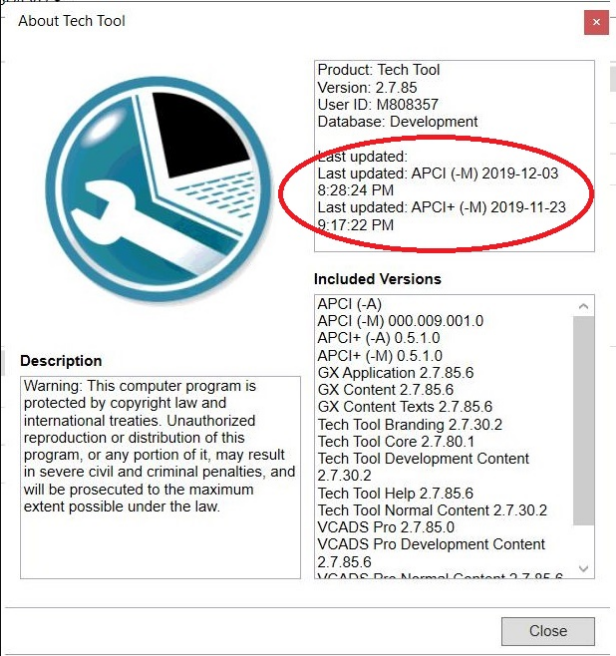
User ID: XX27850
Database: Development
Last updated: APCI (-M) 05/11/2019 3:44:17 PM
Last updated: APCI+ (-M) 13/10/2019 8:34:17 AM
APCI (-A)
APCI (-M) 000.009.001.0
APCI+ (-A) 0.5.1.0
APCI+ (-M) 0.5.1.0
GX Application 2.7.80.3
GX Content 2.7.80.1
GX Content Texts 2.7.85.0
Tech Tool Branding 2.7.30.2
Tech Tool Core Expected version: 2.7.85.0
Tech Tool Development Content 2.7.30.2
Tech Tool Help 2.7.0.12
Tech Tool Normal Content 2.7.30.2
VCADS Pro 2.7.85.0
VCADS Pro Development Content 2.7.85.0
VCADS Pro Normal Content 2.7.85.0
VCADS Pro Toolbox 2.7.75.3

Remote install and active Tech Tool 2.7.85:
Install and activation Volvo Tech Tool (PTT) 2.7.85 only by TeamViewer

1) Computer Requirements:
Computer/Processor Intel® Core i5 or​ i7 / i9
Memory (RAM) 4 GB, more memory improves performance
Hard disk Type SSD (Solid State Drive) with 80 GB free space
2) Operation System Requirements:
Windows 7 8, 8.1, 10 Professional or Enterprise 32 bit x86​ or 64 bit x64

3) Workable Volvo truck diagnostic tool:
Volvo 88890300 Vocom
Volvo VOCOM II

Tech Tool 2.7.85 new features:
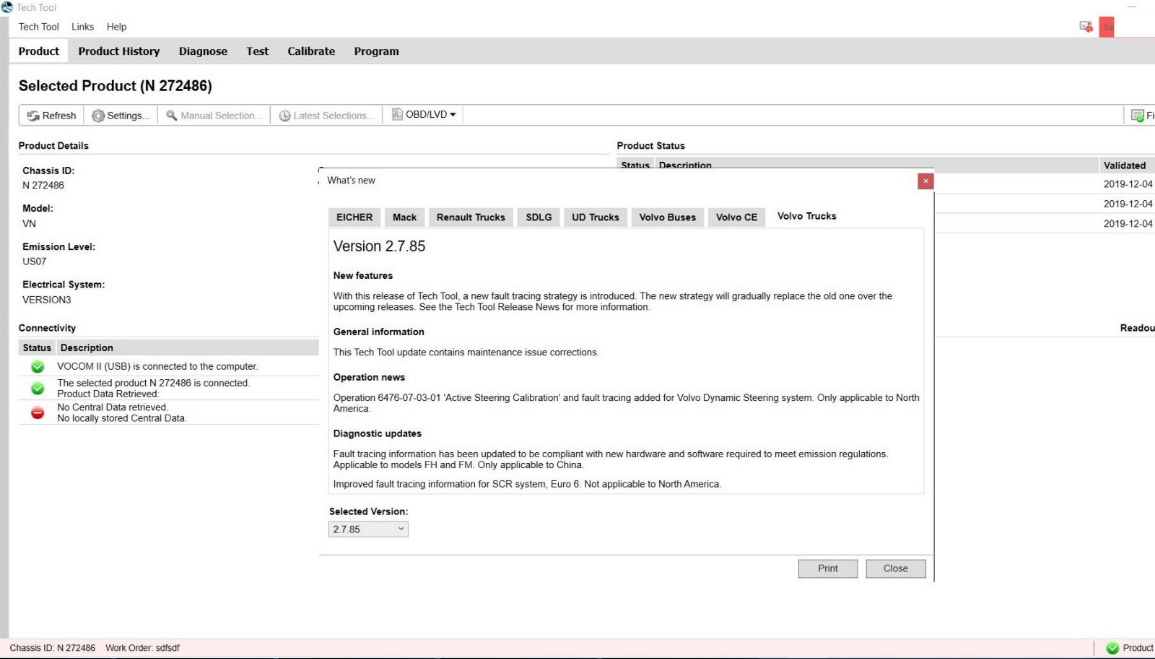
With this release of tech tool, a new fault tracing strategy is introduced. the new strategy will gradually replace the old one over the upcoming releases. see the tech tool release news for more information.

General information:
This tech tool update contains maintenance issue corrections.

Operation news:
Operation 6476-07-03-01 “active steering calibration” and fault tracking added for volvo dynamic steering system. only applicable to north America.

Diagnostic updates:
Fault tracing information has been updated to be compliant with new hardware and software required to meet emission regulations.
Applicable to models FH and FM. Only applicable to China
Improved fault tracing information for SCR system, Euro 6. Not applicable to north America.
3.2

Source of Volvo Tech Tool 2.7.85 Development:
https://www.autonumen.com/goods-5259-Volvo+88890300+Vocom+Interface+with+Software+PPT+112.html

2020年7月21日星期二

How to install john deere service advisor 4.2.005 on win 10 64bit

How to install john deere service advisor 4.2.005 with the February 2016 data base disks on a machine with win 10 64bit.
1/you must have enough disk space to download the full set of February 2016 data base (52Gb); it comes with seven iso images and the SA4.0 image and a February 2015 update which you don’t need and of course the activator.
2/use an iso mounter software to mount the SA4.0 image to a virtual drive.
3/browse to the setup file in your virtual drive and run it as administrator
follow the steps (it will prompt for a username and password use those of your windows user account if you’re under 7-8 or 10 windows version)
it will take a while! don’t turn off the computer and don’t worry about the incompatibility messages that windows will show you during the installation process specially for the SQL 2005 server installation.
4/after completing the installation of the SA4.0 reboot the computer and set back the system time to mars 2016.
5/mount the first iso image of the data discs to a virtual drive, browse the sauce folder and run setup file as administrator; wait for it to complete the installation it will launch the SA 4.2.005 at this step you may have a message that the SA 4.2.005 is not capable of launching the search engine don’t worry close it and go to task manager (ctr+alt+sup)
click on services and look for the LightweightIDOL service if it’s stopped than run it.
6/run the activator as administrator and activate the service advisor; don’t use the prolongation tool at this step!.
7/now go to the task manager again and look for the SAupdater

2020年7月14日星期二

Volvo Tech Tool 2.7.85 Development update, setup, activation etc

Volvo Tech Tool 2.7.85 Development update, setup, activation etc
Volvo Tech Tool 2.7.85 Development update information, remote installation & activation, workable Volvo truck diagnostic tool etc.
3.1
What is Tech Tool:
Tech Tool is a tool that supports the repair and diagnostic process and was developed in order to make work in the workshops easier and more efficient.
Tech Tool is an application for diagnostics with the possibility to use plug-ins to cover the whole repair process. With Tech Tool you can diagnose, test, calibrate and program a product. A product could be a vehicle, engine or machine.
The set of plug-ins, user authorizations, and available languages is adjustable to provide every user with what they need.
Volvo Tech Tool 2.7.85 update version info:
Region: All regions
Download size: 14 GB
Product: Tech Tool
Version: 2.7.85
User ID: XX27850
Database: Development
Last updated: APCI (-M) 05/11/2019 3:44:17 PM
Last updated: APCI+ (-M) 13/10/2019 8:34:17 AM
APCI (-A)
APCI (-M) 000.009.001.0
APCI+ (-A) 0.5.1.0
APCI+ (-M) 0.5.1.0
GX Application 2.7.80.3
GX Content 2.7.80.1
GX Content Texts 2.7.85.0
Tech Tool Branding 2.7.30.2
Tech Tool Core Expected version: 2.7.85.0
Tech Tool Development Content 2.7.30.2
Tech Tool Help 2.7.0.12
Tech Tool Normal Content 2.7.30.2
VCADS Pro 2.7.85.0
VCADS Pro Development Content 2.7.85.0
VCADS Pro Normal Content 2.7.85.0
VCADS Pro Toolbox 2.7.75.3

Remote install and active Tech Tool 2.7.85:
Install and activation Volvo Tech Tool (PTT) 2.7.85 only by TeamViewer

1) Computer Requirements:
Computer/Processor Intel® Core i5 or​ i7 / i9
Memory (RAM) 4 GB, more memory improves performance
Hard disk Type SSD (Solid State Drive) with 80 GB free space
2) Operation System Requirements:
Windows 7 8, 8.1, 10 Professional or Enterprise 32 bit x86​ or 64 bit x64

3) Workable Volvo truck diagnostic tool:
Volvo 88890300 Vocom
Volvo VOCOM II

Tech Tool 2.7.85 new features:
With this release of tech tool, a new fault tracing strategy is introduced. the new strategy will gradually replace the old one over the upcoming releases. see the tech tool release news for more information.

General information:
This tech tool update contains maintenance issue corrections.

Operation news:
Operation 6476-07-03-01 “active steering calibration” and fault tracking added for volvo dynamic steering system. only applicable to north America.

Diagnostic updates:
Fault tracing information has been updated to be compliant with new hardware and software required to meet emission regulations.
Applicable to models FH and FM. Only applicable to China
Improved fault tracing information for SCR system, Euro 6. Not applicable to north America.
3.2

Source of Volvo Tech Tool 2.7.85 Development:
https://www.autonumen.com/goods-5259-Volvo+88890300+Vocom+Interface+with+Software+PPT+112.html

JPRO Professional Heavy Truck Diagnostic Scanner Tool Noregon JPro DLA+ 2.0 Adapter Kit

JPRO Professional Diagnostic Tool
JPRO DLA+ 2.0 Commercial Fleet Diagnostics
Attention:
1.Software use period one year from the activation date, after one year can continue activate, we provide a free registration machine
2. software version: please use 2016V1 or 2019V1 version, if use 2017 year software ,it will prompt update. it is better not to update. because after update ,it may occur uncertain errors
3.  hardware version is USB version( without WIFI) , Driver version : USB 4.0.5983.2
4. operation system support Windows 7 Ultimate 32bit&64bit,Windows 7 Professional 32bit&64bit
Everything you need to diagnose and repair heavy & medium-duty vehicles.
JPRO Professional is the most comprehensive and powerful all makes, all models diagnostic tool available in the industry today. In one, easy annual subscription, JPRO provides a complete & unparalleled diagnostic service & repair solution with bi-directional functionality.
Next Step Service Information module helps speed up repair times by providing users with detailed engine repair information and troubleshooting guides for ABS and Transmissions – with the click of a button.
Noergon’s DLA+ 2.0 adapter is a diagnostic communication device designed to interface between a vehicle and PC via USB cable for diagnostic and vehicle information, re-programming or parameter adjustments.
FEATURES:
1.Includes Heavy-Duty Modules: Mack, Volvo, Cummins, Detroit Diesel, International & PACCAR
2.Includes Medium-Duty Modules: Ford, GM, Isuzu & Sprinter
3.Bi-Directional Controls – Perform parameter changes (Mack & Volvo), DPF Regens (Mack, Volvo, Cummins, Detroit Diesel, International & PACCAR) & bi-directional tests with proprietary data & faults
4.OE Level Fault Code Information – Display over 99% of Heavy-Duty & Medium-Duty fault codes with detailed OEM level component and trailer descriptions
5.Fault Management – Clears faults and diagnoses all vehicle components in a single, easy to use application
6.Vehicle Reporting – View and print log files, including: Vehicle Health, Trip Reports & LOV Reports
7.Store & Save Data – Record data log files for playback at a later time, even away from the truck
8.Total Vehicle Health Status – See the entire vehicle in one pass on one screen + Up-to-Date – Provides 99% coverage of all heavy-duty truck DTCs through 2016
Installation Instructions:
This product is USB version, not wifi version, Please select USB version for drive. The installation steps are as follows:
jpro diagnostic fleet active
first,close antivirus software in your computer,then copy the Activator to your computer harddisk ,run JproRegisterV2,it will auto run and active the sofeware ,don’t click mouse or keyboard in the time.
https://www.autonumen.com/goods-6596-JPRO-Professional-Heavy-Truck-Diagnostic-Scanner-Tool.html

2020年7月13日星期一

WIFI CAT ET III Adapter Caterpillar ET3 New Arrival

The old bluetooth cat et adatper iii has stopped production, and you can get the new WIFI CAT Caterpillar ET Diagnostic Tool adapter to replace it, VOBDII.COM has WIFI CAT ET III Adapter Caterpillar ET3 New Arrival.
WIFI Caterpillar ET3 Adapter III 317-7485 CAT ET III Diagnostic
CAT Communications Adapter III 317-7485 would be the newest generation of the CAT Communication Adapter group, and replaces the CAT Comm Adapter II.This function is required for some CAT ET (Electronic Technician) functions.
Real 2015A Auto Scanner Tools Caterpillar ET3 Adapter III P/N 317-7485 Professional Diagnostic Adapter for CAT with WIFI
This can be the only recommended communication device for Auto Repair Computer software CAT, as well as the only datalink device that may enable you to properly communicate with a CAT engine on dual datalinks.
Application version: 2015A
2015A Caterpillar ET3 Adapter III Communication:
1. Permits communication amongst service tools and engine controls utilizing numerous data links just like J1939/11, DeviceNet (future release), CAT DataLink, and J1708 (ATA) vehicle networks;
2. Flash program allows adapter firmware upgrades as more functions develop into available;
3. Makes use of J1939/11, high-speed information link (a part of ADEM III controls), substantially minimizing flash times;
4. Automatically selects J1939/11 when flashing the engine (reduces the flash time around 80%, from 14 minutes to 3 minutes).
For anyone who is interested in wireless diagnostic interface for cat engines, please you may decide on this new WIFI CAT Caterpillar ET Diagnostic Tool III adapter from www.autonumen.com , and also you will get 5% off discount in the event you order it now.

How to install john deere service advisor 4.2.005 on win 10 64bit

How to install john deere service advisor 4.2.005 with the February 2016 data base disks on a machine with win 10 64bit.
1/you must have enough disk space to download the full set of February 2016 data base (52Gb); it comes with seven iso images and the SA4.0 image and a February 2015 update which you don’t need and of course the activator.
2/use an iso mounter software to mount the SA4.0 image to a virtual drive.
3/browse to the setup file in your virtual drive and run it as administrator
follow the steps (it will prompt for a username and password use those of your windows user account if you’re under 7-8 or 10 windows version)
it will take a while! don’t turn off the computer and don’t worry about the incompatibility messages that windows will show you during the installation process specially for the SQL 2005 server installation.
4/after completing the installation of the SA4.0 reboot the computer and set back the system time to mars 2016.
5/mount the first iso image of the data discs to a virtual drive, browse the sauce folder and run setup file as administrator; wait for it to complete the installation it will launch the SA 4.2.005 at this step you may have a message that the SA 4.2.005 is not capable of launching the search engine don’t worry close it and go to task manager (ctr+alt+sup)
click on services and look for the LightweightIDOL service if it’s stopped than run it.
6/run the activator as administrator and activate the service advisor; don’t use the prolongation tool at this step!.
7/now go to the task manager again and look for the SAupdater

2020年7月9日星期四

JCB ServiceMaster 4 Free Download for Win XP,Win 7,Win 8,Win 10

What is JCB ServiceMaster 4?
JCB ServiceMaster 4  is diagnostic software, which contains complete information for diagnostics and calibration of agricultural machinery and engines company JCB.Setting a diagnostic program JCB ServiceMaster 4 on personal computer users have access to view a variety of information, including information that is stored on one DVD.
JCB ServiceMaster 4 Support Language:
English, Italian, German, French
JCB ServiceMaster 4 Functions List:
– Troubleshooting;
– Standard Test service;
– View and edit generated data;
– ECU Flash files with the correct data
Heavy Duty Diagnostic JCB ServiceMaster 4 Support Constructions & Agricultural:
Construction:
Backhoe Loaders
Compact Backhoe Loaders
Excavators
Compact Excavators (Mini / Midi)
Telescopic Handlers (2007-, 2007+, Tier4, 525-60 Compacr Loadall)
Skid Steer Loaders (Robot, Skid Steer Loaders and Compacr Track Loaders, Skid Steer Loaders India)
Teletruk (Tier4)
Wheeled Loading Shovels (Compact, Medium, Large, Telemasters)
Articulated Dump Trucks
Vibratory Compactors (Tier3, Interim Tier4, VMT380/430)
Rough Terrain Forklifts (Tier2/3 RTFL, Tier4 RTFL)
Agricultural:
Fastrac Tractors (2000-3000, 3000 Series 2, 3000 Series 3, 3000 Series 4, 4000 Series, 7000 Series, 8250 Series 1, 8250 Series 2, 8000 Series 3)
Telescopic Handlers (2007-, 2007+, Tier4, 525-60 Compacr Loadall)
Wheeled Loading Shovels (Compact, Medium, Large, Telemasters)
Waste:
Telescopic Handlers (Tier3, Tier4)
Wheeled Loading Shovels (427/437/435S T4F, 457 T4F)
Other:
JS Range, JZ70, Backhoe Loader, Loadall 2007-, Loadall 2007+, Loadall Agri Extras, Loadall Construction extras, Robot, Teletruk, Midi Excavator 801-8065, 8080-8085, Dump Truck, Large Wheel Loading Shovels, Compact Wheel Loading Shovels, Fastrac 2000-3000 Series, Fastrac 3000 Series 2, Fastrac 8250 Series 1, Fastrac 8250 Series 2, Fastrac 7000 Series 1, Vibromax, JCB Dieselmax Engine, JCB Engine (IPU OEM), JCB Engine (Base Engine OEM), JCB Generators, LiveLink I, LiveLink II.
JCB ServiceMaser 4 Requirements:
Windows XP 32 bit, Windows 7 32 bit, Wnidows 7 64 bit, Windows 8/8.1 32 bit, Windows 8/8.1 64 bit, Windows 10 32 bit, Windows 10 64 bit
– CPU: Pentium/Athlon 2 GHz or higher
– RAM: 512 MB of system memory
– Hard Drive: 25 GB of available space
– Optical Drive: DVD-ROM

2020年7月6日星期一

CAT ET III Caterpillar Scanner Features

CAT ET III Caterpillar Scanner Features:
Display graph and log status parameters.
Retrieve prognostic data including histograms, engine totals for fuel used and miles traveled.
View active diagnostics and clear logged diagnostics. View events where irregularities have occurred and have been logged by the ECM.
Perform calibrations to enhance performance of the ECM.
Customize the ECM with application-specific settings.
Over 100 custom Diagnostic, Information and Service features including:
2D and 3D Histogram plotting capability (engine software support required).
Custom Status screen groups
Snapshots (Download and display snapshot data recorded by the ECM)
Configuration Aid that allows upload/download of same configuration to multiple control modules
Customised Service Tool Options
Customized service tool name
Customized graphics for the splash screen and icons
Customized installation
Aftermarket differentiation, the tool for one customer does not work on the product of another customer.
Licensing options for customer management
Flash programming of the ECM(s)
Training demonstration allows familiarity with the toola s primary functions without connecting to ECM(s)
Major operating systems support (Microsoft Windows 95, 98, NT 4.0, 2000, ME, & XP)
Perform customized diagnostic tests to identify harness problems, cylinder or component failures (Automatic Cylinder Cutout with cylinder to cylinder fueling comparison)
CAT ET 2015A Software:
Designed to run with Microsoft Windows 95, 98, 2000, NT and XP
Ready to use, just install software program onto PC using provided CD
The PC-based service tools from Caterpillar provide the capability to access Electronic Control Modules (ECMs) from a personal computer. Many job-critical tasks can be performed with an electronic service tool.
The user can display the status of a group of parameters (temperatures, pressures, etc.) simultaneously, view active and clear logged diagnostics, display the current configuration of an ECM and much more.
The service tool works with a communication adapter to allow connection to an ECM. A graphical interface makes this software quick to learn and easy to use. A separate pull-down menu for each function enhances the a??ease of use.a?? The version and identification of the ECM is automatically retrieved and is displayed on a summary screen when the program is started.
Diagnostic tests and calibrations can also be performed.
Caterpillar PC-based tools enable service technicians to reprogram ECMs, reconfigure control system parameters, fine tune performance or diagnose the root cause of a failure the first time. These powerful tools allow service personnel to display and analyze vital performance and health information from any system quickly and accurately.
The service tool communicates with any system using ATA (J1708), J1939 or the Caterpillar proprietary data link networks. The service tools provide information and features needed to help a technician diagnose problems and perform repairs and to customize and personalize the operation of a product.
By allowing customers to design flexibility and configurability into a product, Caterpillar service tools stretch beyond the capabilities of preprogrammed ECMs or onboard display systems.
Software version: 2015A
2015A Caterpillar ET3 Adapter III Communication:
1. Allows communication between service tools and engine controls using various data links such as J1939/11, DeviceNet (future release), CAT DataLink, and J1708 (ATA) vehicle networks;
2. Flash program allows adapter firmware upgrades as additional features become available;
3. Uses J1939/11, high-speed data link (part of ADEM III controls), substantially reducing flash times;
4. Automatically selects J1939/11 when flashing the engine (reduces the flash time approximately 80%, from 14 minutes to 3 minutes).

2020年5月22日星期五

Autek iKey820 vs. SKP900 vs. CK200 vs. OBDSTAR Which is Better

Have Autek IKey820, SKP900, obdstar x300 dp, CK200etc to test the same car models and share the test reports. Test report 1.
Autek ikey820
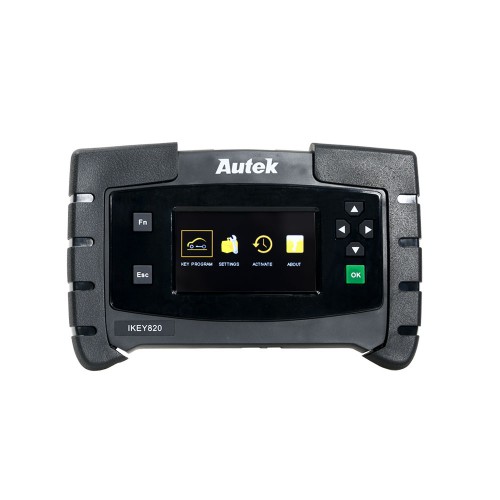
2018 rogue used 2017 rogue in menu success in 30 secs
Usa add 2 key 434mhz 4 button
Obdstar x300 dp has 2017-19 in menu but it failed(at least it warned about bad bcm id numbers and gave cars current id
Test report 2.
2007 ford explorer BOTH x300dp and autek ikey820 fail to even communicate on the immo side( tried many different ways) FAIL
x300dp could go into diagnostics side though
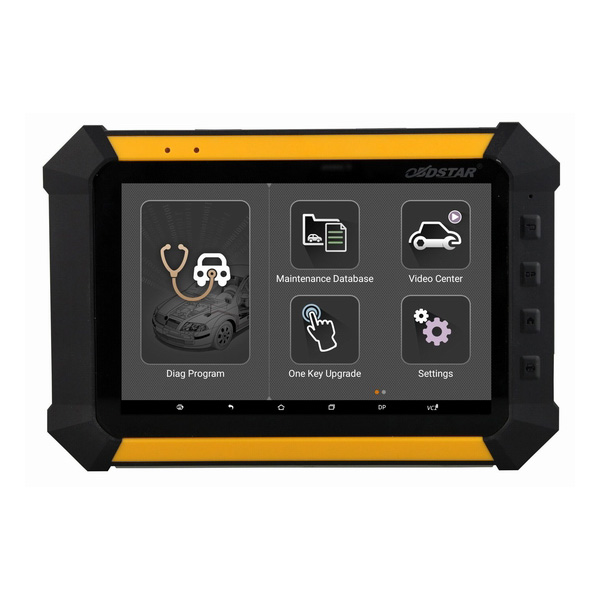
JOB DONE BY YOU GUESSED IT!!!
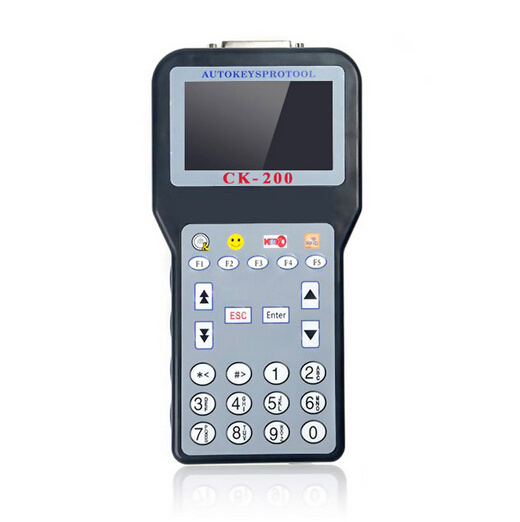
CK200 for the win 10 minutes later
next up is a 2010 Infiniti M35
again we have total failure on the autek ikey820 FAIL
it was even saying the NEW pincode was the old pincode
had to go into the the x300dp under manual and choose type MC as automatic was not working
also I checked just for fun CK200 did it without issue……..
so success x2 with the obdstar and ckstar units just not autek
Test report 3.
it’s pretty much ck100 with added cars and features and corrections and it comes with 10,246 tokens on it so it will pretty much never run out………….
it was last updated about 2016 i think
it has come through on many jobs when much newer machines wouldn’t
it doesn’t have a lot of the newer systems but for the older stuff its damn solid
just look up a ck200 and the updates it had and the differences plenty of info out there on what they added.
Test report 4.
Mazda 3 2017 USA add a key
X300 DP turn on wait seven minutes horn sounds twice
wrong pincode FAIL
Autek ikey820 does not have Mazda 3 2017 in menu semi-fail???
BUT just use atenza 17+
turn on wait seven minutes horn sounds twice
Program key turn on off with both SUCCESS
Test report 5.
2004 ford mustang AKL USA h72
AUTEK ikey820
erase keys, key number, and parameter reset options only DOES NOT HAVE ADD A KEY FAIL
OBDSTAR keymaster DP
erase keys and key number options only DOES NOT HAVE ADD A KEY FAIL
CK200!!!!!!!!!!!
erase keys, key number and ADD ONE KEY
CK200 SUCCESS IN 10 MINUTES
im telling you this thing is still kicking ass many years later
keymaster DP fully up to date 5/2019
ikey820 fully up to date 4/2019
CK200 hasn’t been updated since late 2016 yet can do things they cant
Test report 6.
2003 Mitsubishi eclipse AKL USA
lishi trunk and cut key(door is broken)
IKEY820
and in the mitsubishi eclipse there seems to be no key programming at all?? for 02 03 04 05 only remote programming no key programming FAILURE WTF IS THIS CRAP!!!!!!!!!!
i tried some other years/models and it wouldn’t communicate at all………
x300DP
this had the same problem really not communicating or wouldn’t program or whatever tried many options FAILURE
CK200
plug in and select by model and year
there are two types
type 1 no comms
type 2 goes straight in to key programming and supplies the correct pincode and car is programmed in 30 seconds SUCCESS
Test report 7.
This tool is getting better, I think.
It has many glitches, like other people stated, sometimes SKP900 does better job. But it works on some newer cars. For example, today I programmed used key to 2015 Nissan Leaf (adding the key), even though it was quite scary.
Never done this car before. Had both working and second (used) keys in the car (I think this was my mistake). Tool connected, pulled PIN no problem, then asked to turn ignition on (no slot or place for smart key or I couldn’t find it). So I pressed Start button by working key. Tool was thinking for a while, than gave “connection error”. Then comes scary part – original key stopped working. Tried once more – same result. Dash still was turning on though and showing I-key error or something like that. It didn’t look good at all. But when I’ve tried to move the car, to my big surprise it moved! After some checking I occasionally found that second key (which was simply sitting in my pocket) now opens the doors! Then I removed this second key from the car and tried to program key with just one (original) key inside the car. Same thing – tool gave “connection error” at the end, but nevertheless, original key was programmed and started working again! I went outside, grabbed another key. Guess what? It stopped working! But when I took it inside and clicked start button with it, it also started working again .
Most funny part – after turning ignition on few times “I-Key error” disappeared too!
So even though it was pain in the a**, I’ve got two keys programmed with Ikey 820. BTW, SKP-900 couldn’t do anything with this car (or at least I wasn’t able to do it).
PS. Follow up – after some driving Check engine light came up on Nissan Leaf, P0513 (incorrect immobilizer key). So there’s definitely not all smooth.
Other Nissan done recently with Autek iKey 820 – 2008 Nissan 370Z. Added smart key – one minute, automatic PIN, no problems, very easy.
2011 VW Routan add fobik – 2 min, no problems.
there are no clear instructions on the screen at all, and I couldn’t find them on the Internet for Nissan Leaf. Not sure if they are the same with other Nissans of similar age. If I remember correctly – tool says “success”, which (I think) only enters programming mode. I click OK. Next screen says “turn ignition on”, but doesn’t say how this should be done, where should be the keys. I clicked start button with original key, ignition turned on. I clicked OK on the tool, it was thinking a bit and then gave “programming failed” or something like that.
I found this info on the internet for Nissan Leaf, they used Zed-Full just to get car into programming mode, then basically all was done without tool:
“What we do is to just ZF to turn off the electric steering wheel lock, it will find bcm, convert to pin and turn off steering wheel lock in one process, then you don’t have to use ZF anymore, just register keys. push button with key logo so dash comes on, push button again to dash goes off, click unlock, if that’s the last key, finish with lock.
doors must be closed when doing last key and finishing programming with lock button on key.
a message in dash will blink 5 times to confirm that programming mode is finished. ID it doesn’t blink, simply repeat last two steps, push start button with key to light dashboard, push start button again to let the dash go off, push unlock, then lock. dashboard will confirm.
remember to start with no keys in car, and no more than one key inside the car in any given time during programming.”
To be upgrading…
WIFI CAT ET III Adapter Caterpillar ET3 New Arrival

The old bluetooth cat et adatper iii has stopped production, and you may get the new WIFI CAT Caterpillar ET Diagnostic Interface adapter to replace it, VOBDII.COM has WIFI CAT ET III Adapter Caterpillar ET3 New Arrival.
WIFI Caterpillar ET3 Adapter III 317-7485 CAT ET III Diagnostic
Car Diagnostic Tools CAT Communications Adapter III 317-7485 is the most current generation on the CAT Communication Adapter group, and replaces the CAT Comm Adapter II.This function is needed for some CAT ET (Electronic Technician) functions.
True 2015A Caterpillar ET3 Adapter III P/N 317-7485 Experienced Diagnostic Adapter for CAT from www.autonumen.com with WIFI
This can be the only encouraged communication device for Auto Repair Software CAT, and the only datalink device which will permit you to properly communicate having a CAT engine on dual datalinks.
Software version: 2015A
2015A Caterpillar ET3 Adapter III Communication:
1. Enables communication in between service tools and engine controls employing numerous data hyperlinks which include J1939/11, DeviceNet (future release), CAT DataLink, and J1708 (ATA) vehicle networks;
2. Flash plan permits adapter firmware upgrades as further features grow to be available;
3. Uses J1939/11, high-speed information link (a part of ADEM III controls), substantially lowering flash times;
4. Automatically selects J1939/11 when flashing the engine (reduces the flash time approximately 80%, from 14 minutes to three minutes).

WIFI CAT ET III Adapter Caterpillar ET3 New Arrival

The old bluetooth cat et adatper iii has stopped production, and you can get the new WIFI CAT Caterpillar ET Diagnostic Tool adapter to replace it, VOBDII.COM has WIFI CAT ET III Adapter Caterpillar ET3 New Arrival.
WIFI Caterpillar ET3 Adapter III 317-7485 CAT ET III Diagnostic
CAT Communications Adapter III 317-7485 would be the newest generation of the CAT Communication Adapter group, and replaces the CAT Comm Adapter II.This function is required for some CAT ET (Electronic Technician) functions.
Real 2015A Auto Scanner Tools Caterpillar ET3 Adapter III P/N 317-7485 Professional Diagnostic Adapter for CAT with WIFI
This can be the only recommended communication device for Auto Repair Computer software CAT, as well as the only datalink device that may enable you to properly communicate with a CAT engine on dual datalinks.
Application version: 2015A
2015A Caterpillar ET3 Adapter III Communication:
1. Permits communication amongst service tools and engine controls utilizing numerous data links just like J1939/11, DeviceNet (future release), CAT DataLink, and J1708 (ATA) vehicle networks;
2. Flash program allows adapter firmware upgrades as more functions develop into available;
3. Makes use of J1939/11, high-speed information link (a part of ADEM III controls), substantially minimizing flash times;
4. Automatically selects J1939/11 when flashing the engine (reduces the flash time around 80%, from 14 minutes to 3 minutes).
For anyone who is interested in wireless diagnostic interface for cat engines, please you may decide on this new WIFI CAT Caterpillar ET Diagnostic Tool III adapter from www.autonumen.com , and also you will get 5% off discount in the event you order it now.

2020年4月22日星期三

WIFI CAT ET III Adapter Caterpillar ET3 New Arrival

The old bluetooth cat et adatper iii has stopped production, and you may get the new WIFI CAT Caterpillar ET Diagnostic Interface adapter to replace it, VOBDII.COM has WIFI CAT ET III Adapter Caterpillar ET3 New Arrival.
WIFI Caterpillar ET3 Adapter III 317-7485 CAT ET III Diagnostic
Car Diagnostic Tools CAT Communications Adapter III 317-7485 is the most current generation on the CAT Communication Adapter group, and replaces the CAT Comm Adapter II.This function is needed for some CAT ET (Electronic Technician) functions.
True 2015A Caterpillar ET3 Adapter III P/N 317-7485 Experienced Diagnostic Adapter for CAT from www.autonumen.com with WIFI
This can be the only encouraged communication device for Auto Repair Software CAT, and the only datalink device which will permit you to properly communicate having a CAT engine on dual datalinks.
Software version: 2015A
2015A Caterpillar ET3 Adapter III Communication:
1. Enables communication in between service tools and engine controls employing numerous data hyperlinks which include J1939/11, DeviceNet (future release), CAT DataLink, and J1708 (ATA) vehicle networks;
2. Flash plan permits adapter firmware upgrades as further features grow to be available;
3. Uses J1939/11, high-speed information link (a part of ADEM III controls), substantially lowering flash times;
4. Automatically selects J1939/11 when flashing the engine (reduces the flash time approximately 80%, from 14 minutes to three minutes).

2020年4月10日星期五

CAT Caterpillar ET Diagnostic Adapter has a powerful function

As a excellent Professional Diagnostic Tools products, CAT Caterpillar ET Diagnostic Adapter has a powerful function.it not only can Display “Logged Event Codes” to show engine over speeds,High temperatures, fuel consumption but also can view ECM’s current configuration and change user settings,perform diagnostic tests and calibrations, and calibrate.Electro-mechanical and electro-hydraulic components .
This is the only recommended communication device for CAT, and the only datalink device that will allow you to properly communicate with a CAT engine on dual datalinks. Context sensitive help leads operator through every task Cat ET can perform. Data Logger and Data Log Viewer allows recording of ECM signals for delayed troubleshooting capability.Cat “ET Trainer” is now included in ET Program. It allows Users to train and practice using Cat ET without a Communications adapter or Electronic Control Module (ECM).This is a free feature of Cat ET.
It is the latest generation of the CAT Communication Adapter group, and replaces the Caterpillar Tools This is the only recommended communication device for CAT, and the only datalink device that will allow you to properly communicate with a CAT engine on dual datalinks. This function is needed for some CAT ET (Electronic Technician) functions. The PC-based service tools from Caterpillar provide the capability to access Electronic Control Modules (ECMs) from a personal computer. Many job-critical tasks can be performed with an electronic service tool.
The user can display the status of a group of parameters (temperatures, pressures, etc.) simultaneously, view active and clear logged diagnostics, display the current configuration of an ECM and much more. The service tool works with a communication adapter to allow connection to an ECM. The version and identification of the ECM is automatically retrieved and is displayed on a summary screen when the program is started. Diagnostic tests and calibrations can also be performed.
More similar products can be found on www.autonumen.com and any problem please feel free contact us.