2020年11月10日星期二

How to Program Injectors for Caterpillar C7 Engine with CAT Caterpillar ET Diagnostic Adapter III?


How to Program Injectors for Caterpillar C7 Engine with CAT Caterpillar ET Diagnostic Adapter III?

2020A is an upgraded version of 2019C , A represents the first quarter, and C is the software updated in the third quarter.

2020A Cat ET software as Cat Caterpillar ET 2018C 2019A 2019C Software update version, 20120A Caterpillar Electronic Technician softwarer With CAT ET 3 Cat caterpillar adapter 3 support caterpillar diagnostic till 2020.

Procedures:

Connect CAT3 interface to DLC,and then run CAT ET diagnostic software and build connection

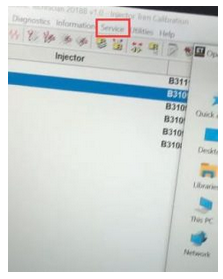
Select “Service” calibration function
11.1
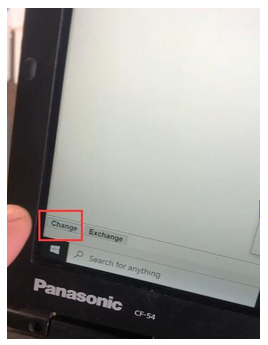
Perform injector replacement programming,and click “Change”
11.2
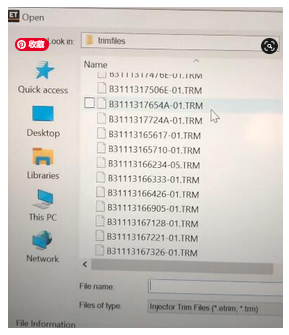
Load the injectors matched trim files
11.3
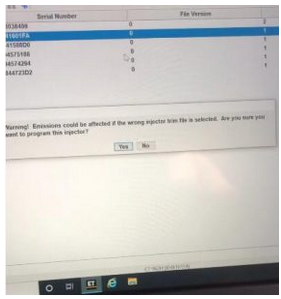
Warning message!

Emissions could be affected if the wrong injector trim file is selected.Are you sure you want to program this injector?

Click “Yes”
11.4
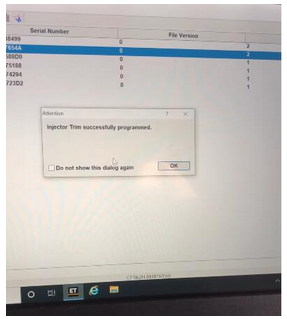
Injector Trim successfully programmed.
11.5

2020年10月21日星期三

Good Choice NEXIQ USB Link for Heavy-Duty Truck Diagnosis


What are the features of NEXIQ USB Link

Compatible with applications that diagnose engines, transmissions, ABS, instrument panels and more.
Reduce reprogramming times with direct USB connection.
Mixed fleet capabilities with broad protocol support.
Quick access to vehicle data for maintenance or management reports.
Quickly attaches to vehicle’s diagnostic connector.
Easy portability increases flexibility, May be used with desktop PC or laptop.

What is the NEXIQ protocol list?

CAN – J1939/CAN125/CAN250/CAN500/CAN1000
2nd CAN – J1939/CAN125/CAN250/CAN500/CAN1000
J1587/J1708 J1850 J2534
ISO 15765 (Diagnostic CAN)
ISO 14230 (KWP2000 over ISO9141) ALDL ATEC 160 (160 baud)

NEXIQ support Heavy-Duty, Light-and Medium-Duty Trucks, CONSTRUCTION EQUIPMENT like (Wheel loader, Articulated Hauler and Excavator), Genset.

What are the packed softwares?

– Allison (Included!)
– Bendix 6.3.8.0 (Included!)
– Detroit Diesel DDDL 7.05 ((Included!)
– Detroit Diesel DDCT (Included!)
– Detroit Diesel Calibration Tool (Included!)
– Eaton Service Ranger 3.2 (Included!)
– International DLB (Included!)
– International ICAP, IPTS, NETS, IPC (Included!)
– International Master Diagnostic (Incluided!)
– Meritor and Wabco Diagnostics (Included!)
– Cummins Insite 7.5 (Included!)
– Hino 2.0.3. (Included!)
– Caterpillar 2.0.1.0 (Included!)
– Perkins EST 2010B (Included!)
– V Macks 2.6.12 (Included!)
– V Macks Dealer Pro (Included!)
– Volvo VCADS 2.35.10 (Included!)
– Toyota Techstream for car (Included!)

If you want to know more,pls check the link:https://www.autonumen.com/goods-5195-NEXIQ-2+USB+Link++Software+Diesel+Truck+Interface+and+Software+with+All+Installers.html

2020年10月15日星期四

185USD – ALL Auto repair software


Regarding the ALL Auto repair software in including 41 software, all of the software with the newest Version. Our store only offer 185USD.

1649_P_1342748598558
Mobile Hard Disk 1000GB, in the HDD have the install video will guid you how to use it. Also we can install the software in PC if you need.

41 software List as following:
1.2014 ALLDATA 10.53   575GB
2.2013 Mitchell           117GB
3.Autodata V3.38         1.33GB
4.WorkShop Vivid 10.2    3.25GB
5.ELSA 4.0              45.5GB
6.ROVER               470MB
7.WIS 0911. 3            11.1MB
8.StarFinder_v3. 4         1.75GB
9.Tolerance_data_2_2009    3.55GB
10.OPEL TIS 2011.3       3.87GB
11.BMW TIS. 5           3.23GB
12.ATSG2005. 6          3.94GB
13.OnDemand5 Transmission. 6       12GB
14.AAMCO DirecTech. 7            10.7GB
15.ZFAT. 8                        777MB
16.BMW WDS13.0. 8               1.26GB
17.VOLVO WDS. 10                16.9GB
18.BMW KSD1008                  5.75GB
19.BOSCH ESI. 11                  17.4GB
20.Mitchell CRS. 12                 21.6GB
21.HY ESIS. 12                    592MB
22.HY EFLASH. 12                 265MB
23.FSMD. 12                      5.16GB
24.TEAM21. 13                    2.57GB
25.KIA TIS. 2008                   7.29GB
26.BENTLEY IETIS. 15              2.77GB
27.GMDW TIS. 15                  436MB
28.ARTIS TECHNIK. 15             1.56GB
29.NISSAN&INFINITI ESM          6.75GB
30.GM ESI 0409                    4.15GB
31.Chevrolet TIS 1102                3.88GB
32.BMW ETK_08_2013              3.67GB
33. Mitchell truck                    1.67GB
34.ImmoKiller_V1.10                 12.8MB
35.NYO4 FULL                      109MB
36.TachoSoft21.5                     14.2MB
37.DAS_KEYGEN_FOR_SRS_AC_INSTRUMENTS  192KB
38.xentry developer                  415KB
39.ECM2001 6.3                    25MB
40.IMMOTOOL  V26.12.2007        59.4MB
41.AD100 T300 SBB MVP Incode Outcode Calculator       1.22MB

If you just only need amont of three or more software you can contact us directly, we can arrange for you.

Learn more information at www.autonumen.com

2020年10月14日星期三

FREE Activation for JPRO Commercial Vehicle Diagnostics


FREE Activation for JPRO Commercial Vehicle Diagnostics
5.1
FEATURE LIST
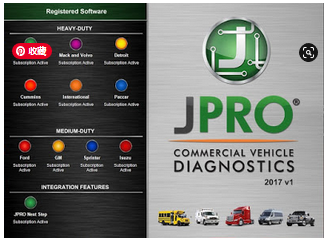
JPRO Professional Diagnostic Software, includes all features provided by the following modules:
-JPRO Heavy-Duty Module
-JPRO Heavy-Duty Command Module – Cummins
-JPRO Heavy-Duty Command Module – Detroit
-JPRO Heavy-Duty Command Module – International
-JPRO Heavy-Duty Command Module – Mack and Volvo
-JPRO Heavy-Duty Command Module – Paccar
-JPRO Medium-Duty Command Module – Ford
-JPRO Medium-Duty Command Module – GM
-JPRO Medium-Duty Command Module – Isuzu
-JPRO Medium-Duty Command Module – Sprinter

Here the STEPS:
1. Install JPRO 2017 v1, download here: JproSetup2017v1
2. Run “HWID3p”, Save to File/ Notepad, then send to my email here: Contact Us
I’ll help to create “regkey.dat” file, to activate your JPRO 2017 v1, download here: HWID3p.rar
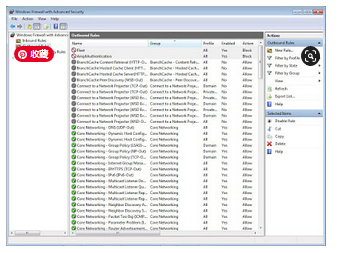
3. Open “Windows Firewall with Advanced Security”, please “Block the connection” on both Inbound Rules and Outbound Rules:
-AmpliAuthentication.exe
-Fleets.exe
Find the files on C:Program Files (or Program Files x86)NoregonJPRO Diagnostics
5.2
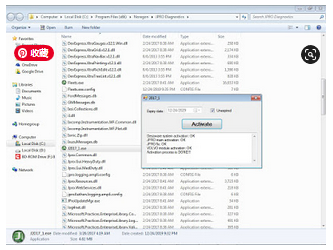
4. Copy all files on “copy to JPRO” folder to C:Program Files (or Program Files x86)NoregonJPRO Diagnostics download here: copy to JPRO.rar
-J2017_1.exe
-il.dll
-20171.xex.config
-20171.xex
-regkey.dat (License File)

5. Run “J2017_1.exe” as Administrator, click on “Unexpired” box, then click “Activate” until Activation process is DONE.
5.3
5.4

2020年10月9日星期五

FREE Caterpillar ET-2015A Full Service Dealer, Diagnostic Software for Caterpillar Engines


FREE Setting Caterpillar ET-2015A (Electronic Technician) Full Service Dealer, Diagnostic Software for Caterpillar Engine, ET 2015A

Read More:
FREE Caterpillar ET-2017A Full Service Dealer, Diagnostic Software for Caterpillar Engines
FREE Caterpillar ET-2018C Full Service Dealer, Diagnostic Software for Caterpillar Engines
FREE Caterpillar ET-2019A Full Service Dealer, Diagnostic Software for Caterpillar Engines
FREE Caterpillar ET-2019C (Select Level), Diagnostic Software for Caterpillar Engines
12.1
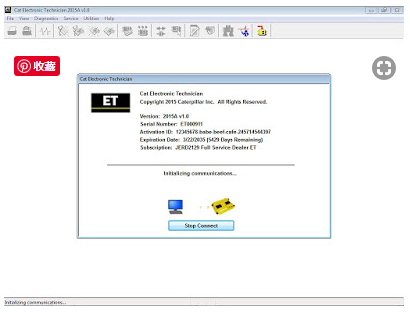
1. Install CAT ET-2015A v1, FREE download here: ET 2015A v1.0

2. Run “NetworkSISID.exe”, FREE download here: NetworkSISID

3. Change Ethernet MAC Address / Ethernet Adapter to : A4 DB 30 7A 1E D2 (Serial ID), then click “Apply Serial”.
12.2
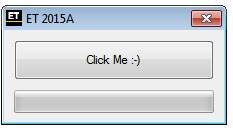
4. Run “ET2015A Activator”, and “Click Me” until “Done”.. Feel FREE to Contact Us.
12.3
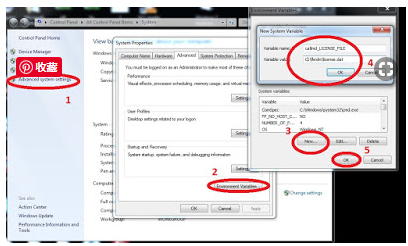
5. Setup Environment Variable:
12.4
environmet variable name -> catlmd_LICENSE_FILE
environmet variable value -> C:flexlmlicense.dat

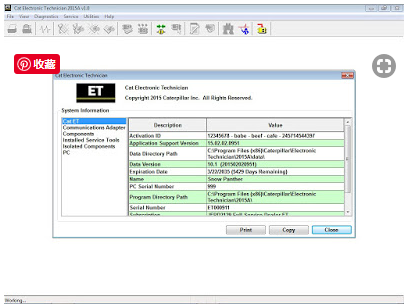
6. Run CAT ET “2015A Electronic Technician” through shortcut on desktop, and Enjoy.
12.5

2020年9月29日星期二

three advantages of CAT Caterpillar ET Diagnostic Tool


The CAT Caterpillar ET Diagnostic Tool works with a communication adapter to allow connection to an ECM. A graphical interface makes this software quick to learn and easy to use. A separate pull-down menu for each function enhances the “ease of use.” The version and identification of the ECM is automatically retrieved and is displayed on a summary screen when the program is started. Diagnostic tests and calibrations can also be performed.

CAT ET is the software based service tool which gives the service technician the capability to communicate and work with the electronic controls on Caterpillar products. I had heard before that there are 2 ET version, customer and dealer. It looks like this CAT ET diagnostic tool is more tend to the dealer. But I think this CAT diagnostic tool is for both customer and dealer.

All in all, with this device there are three advantages:
1.Techniques resulting in lower machine operating and maintenance costs.
2. Tests are provided such as cylinder cutout and injector
3.Activation pressure to make problem locating easy.

2020年9月22日星期二

FREE Caterpillar ET-2015A Full Service Dealer, Diagnostic Software for Caterpillar Engines


FREE Setting Caterpillar ET-2015A (Electronic Technician) Full Service Dealer, Diagnostic Software for Caterpillar Engine, ET 2015A

Read More:
FREE Caterpillar ET-2017A Full Service Dealer, Diagnostic Software for Caterpillar Engines
FREE Caterpillar ET-2018C Full Service Dealer, Diagnostic Software for Caterpillar Engines
FREE Caterpillar ET-2019A Full Service Dealer, Diagnostic Software for Caterpillar Engines
FREE Caterpillar ET-2019C (Select Level), Diagnostic Software for Caterpillar Engines
12.1
1. Install CAT ET-2015A v1, FREE download here: ET 2015A v1.0

2. Run “NetworkSISID.exe”, FREE download here: NetworkSISID

3. Change Ethernet MAC Address / Ethernet Adapter to : A4 DB 30 7A 1E D2 (Serial ID), then click “Apply Serial”.
12.2
4. Run “ET2015A Activator”, and “Click Me” until “Done”.. Feel FREE to Contact Us.
12.3
5. Setup Environment Variable:
12.4
environmet variable name -> catlmd_LICENSE_FILE
environmet variable value -> C:flexlmlicense.dat

6. Run CAT ET “2015A Electronic Technician” through shortcut on desktop, and Enjoy.
12.5

2020年9月9日星期三

JPRO Professional Heavy Truck Diagnostic Scanner Tool


JPRO is the #1 in-shop diagnostic and repair solution used by today’s major fleets and service centers. Offering the most extensive multi-brand coverage and comprehensive diagnostics, JPRO gives you an unparalleled look into the vehicles you repair daily. Use JPRO’s advanced capabilities to detect every issue on the vehicle, resulting in more efficient technicians and improved profits.

With JPRO Professional, technicians at companies ranging from the largest fleet maintenance centers to independent repair businesses can quickly take advantage of our easy-to-use technology to connect to and read the results of an entire vehicle’s systems in about a minute’s time.

This comprehensive readout includes access to the following areas and functions of a vehicle:
Engine controller
Transmission controller
Anti-lock brakes
Exhaust aftertreatment
Body controller
Instrument cluster
Equipped with comprehensive vehicle overviews, your technicians will become far more efficient at diagnosing issues across all makes and models of classes 3 to 8 commercial vehicles. What’s more: They can be confident that they won’t miss minor problems that, if overlooked, could lead to major repairs down the road.

Stop crawling around the vehicle to identify OEM components and diagnose vehicles-let JPRO do the work for you!

Industry-Leading Commercial Vehicle Diagnostic Software
JPRO Professional will scan the entire vehicle, providing detailed component information and enhanced fault code descriptions so you can diagnose faster than ever. Loaded with industry-leading bi-directional capabilities, JPRO will reduce your dependency on hard-to-use OEM software and empower you to do what you do best – repair vehicles.

The Number One Comprehensive Heavy-Duty Truck Diagnostic Scanner
In addition to time savings, JPRO offers access to data you need so that you’re not left scratching your head with a vehicle that’s not included in a lesser diesel diagnostic tool’s database.

With Heavy Duty Diagnostic JPRO as your comprehensive heavy-duty diagnostic solution, you can easily perform scans and repairs on the following makes of commercial vehicles, engines, and transmissions:

Bodies and chassis: Able to scan the bodies and chassis of Bluebird, Ford, Freightliner, GM International, Kenworth, Peterbilt, Mack, Sprinter, Thomas Built, Sterling, Western Star, and Volvo.
Engines: Includes coverage of CAT, Detroit, Cummins, Ford, GM International, Mercedes, PACCAR MX, Mack, Sprinter, and Volvo engines.
Transmissions: Covers Allison, Detroit, GM, Eaton, Mack, Sprinter, Volvo, Ford, and ZF transmissions.
ABS: Can read Bendix, GM, Haldex, Ford, Sprinter, WABCO, and Wabash anti-lock brake systems.

2020年8月19日星期三

FREE Caterpillar ET-2015A Full Service Dealer, Diagnostic Software for Caterpillar Engines


FREE Setting Caterpillar ET-2015A (Electronic Technician) Full Service Dealer, Diagnostic Software for Caterpillar Engine, ET 2015A

Read More:
FREE Caterpillar ET-2017A Full Service Dealer, Diagnostic Software for Caterpillar Engines
FREE Caterpillar ET-2018C Full Service Dealer, Diagnostic Software for Caterpillar Engines
FREE Caterpillar ET-2019A Full Service Dealer, Diagnostic Software for Caterpillar Engines
FREE Caterpillar ET-2019C (Select Level), Diagnostic Software for Caterpillar Engines
12.1
1. Install CAT ET-2015A v1, FREE download here: ET 2015A v1.0

2. Run “NetworkSISID.exe”, FREE download here: NetworkSISID

3. Change Ethernet MAC Address / Ethernet Adapter to : A4 DB 30 7A 1E D2 (Serial ID), then click “Apply Serial”.
12.2
4. Run “ET2015A Activator”, and “Click Me” until “Done”.. Feel FREE to Contact Us.
12.3
5. Setup Environment Variable:
12.4
environmet variable name -> catlmd_LICENSE_FILE
environmet variable value -> C:flexlmlicense.dat

6. Run CAT ET “2015A Electronic Technician” through shortcut on desktop, and Enjoy.
12.5

2020年8月11日星期二

Caterpillar ET 2020A (replaces CAT ET 2019C, 2019B) Electronic Technician Diagnostic Software


CAT Caterpillar ET 2020A (replaces CAT ET 2019C, 2019B) Electronic Technician Diagnostic Software

Caterpillar electronic technician 2020A is an updated version of the caterpillar dealer diagnostic software.

The Built-in Factory Password Generator

The experimental feature allows you to decode (18-Bit passwords not supported) factory passwords

Cat works with the Heavy Duty Truck Scanner Caterpillar Communication Adapters family.
The recommended adapter is a Caterpillar Communication Adapter III Kit PN 538-5051 (Replaces 466-6258).
This diagnostic app allows you to: Change vehicle’s parameters Lock / Unlock parameters Diagnose and reconfigure Reading of error codes ECM Flash

Recently, we have received a lot of questions about the most convenient way to obtain this product.

As soon as payment is done you will be redirected to the download page.

The Electronic Technician application can be easily downloaded.

The small file size(500Mb) allows you to get and set up the app within up to 20 minutes even with the slow internet connection or mobile internet.

The activation takes like 5 minutes and you’re ready to go.

2020年7月23日星期四

Volvo Tech Tool 2.7.85 Development update, setup, activation etc

Volvo Tech Tool 2.7.85 Development update, setup, activation etc
Volvo Tech Tool 2.7.85 Development update information, remote installation & activation, workable Volvo truck diagnostic tool etc.
3.1
What is Tech Tool:
Tech Tool is a tool that supports the repair and diagnostic process and was developed in order to make work in the workshops easier and more efficient.
Tech Tool is an application for diagnostics with the possibility to use plug-ins to cover the whole repair process. With Tech Tool you can diagnose, test, calibrate and program a product. A product could be a vehicle, engine or machine.
The set of plug-ins, user authorizations, and available languages is adjustable to provide every user with what they need.
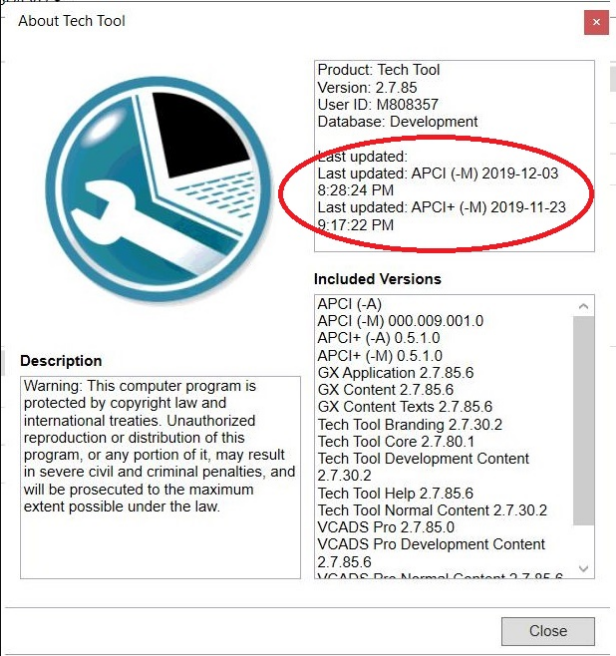
Volvo Tech Tool 2.7.85 update version info:
Region: All regions
Download size: 14 GB
Product: Tech Tool
Version: 2.7.85
User ID: XX27850
Database: Development
Last updated: APCI (-M) 05/11/2019 3:44:17 PM
Last updated: APCI+ (-M) 13/10/2019 8:34:17 AM
APCI (-A)
APCI (-M) 000.009.001.0
APCI+ (-A) 0.5.1.0
APCI+ (-M) 0.5.1.0
GX Application 2.7.80.3
GX Content 2.7.80.1
GX Content Texts 2.7.85.0
Tech Tool Branding 2.7.30.2
Tech Tool Core Expected version: 2.7.85.0
Tech Tool Development Content 2.7.30.2
Tech Tool Help 2.7.0.12
Tech Tool Normal Content 2.7.30.2
VCADS Pro 2.7.85.0
VCADS Pro Development Content 2.7.85.0
VCADS Pro Normal Content 2.7.85.0
VCADS Pro Toolbox 2.7.75.3

Remote install and active Tech Tool 2.7.85:
Install and activation Volvo Tech Tool (PTT) 2.7.85 only by TeamViewer

1) Computer Requirements:
Computer/Processor Intel® Core i5 or​ i7 / i9
Memory (RAM) 4 GB, more memory improves performance
Hard disk Type SSD (Solid State Drive) with 80 GB free space
2) Operation System Requirements:
Windows 7 8, 8.1, 10 Professional or Enterprise 32 bit x86​ or 64 bit x64

3) Workable Volvo truck diagnostic tool:
Volvo 88890300 Vocom
Volvo VOCOM II

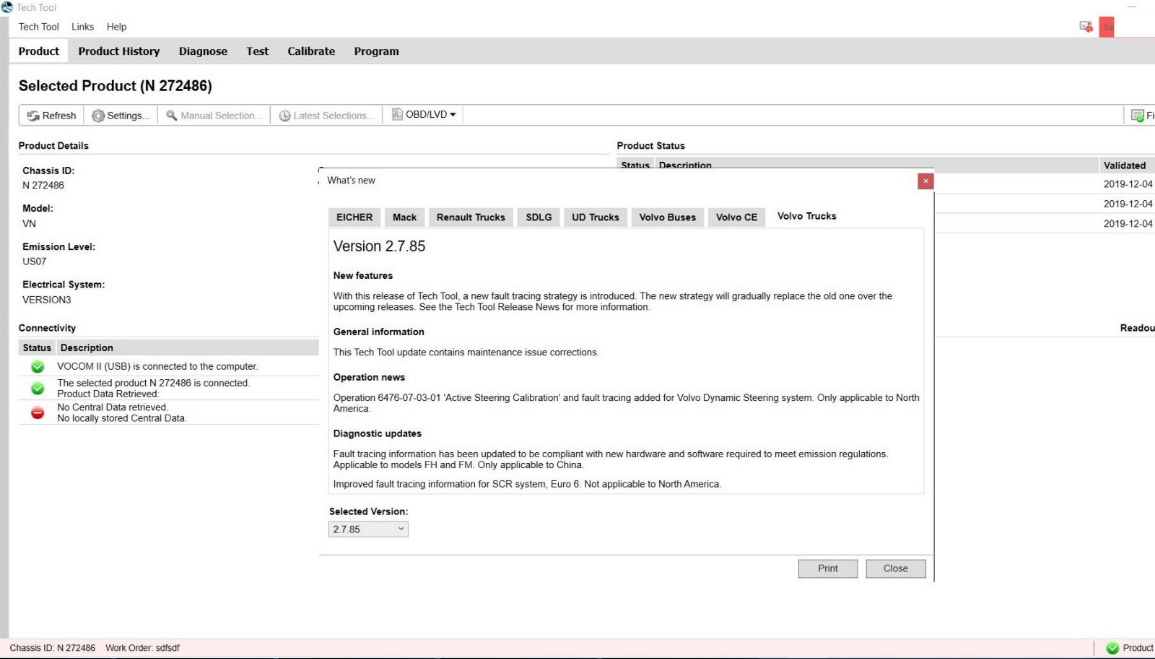
Tech Tool 2.7.85 new features:
With this release of tech tool, a new fault tracing strategy is introduced. the new strategy will gradually replace the old one over the upcoming releases. see the tech tool release news for more information.

General information:
This tech tool update contains maintenance issue corrections.

Operation news:
Operation 6476-07-03-01 “active steering calibration” and fault tracking added for volvo dynamic steering system. only applicable to north America.

Diagnostic updates:
Fault tracing information has been updated to be compliant with new hardware and software required to meet emission regulations.
Applicable to models FH and FM. Only applicable to China
Improved fault tracing information for SCR system, Euro 6. Not applicable to north America.
3.2

Source of Volvo Tech Tool 2.7.85 Development:
https://www.autonumen.com/goods-5259-Volvo+88890300+Vocom+Interface+with+Software+PPT+112.html
2020年7月21日星期二

How to install john deere service advisor 4.2.005 on win 10 64bit

How to install john deere service advisor 4.2.005 with the February 2016 data base disks on a machine with win 10 64bit.
1/you must have enough disk space to download the full set of February 2016 data base (52Gb); it comes with seven iso images and the SA4.0 image and a February 2015 update which you don’t need and of course the activator.
2/use an iso mounter software to mount the SA4.0 image to a virtual drive.
3/browse to the setup file in your virtual drive and run it as administrator
follow the steps (it will prompt for a username and password use those of your windows user account if you’re under 7-8 or 10 windows version)
it will take a while! don’t turn off the computer and don’t worry about the incompatibility messages that windows will show you during the installation process specially for the SQL 2005 server installation.
4/after completing the installation of the SA4.0 reboot the computer and set back the system time to mars 2016.
5/mount the first iso image of the data discs to a virtual drive, browse the sauce folder and run setup file as administrator; wait for it to complete the installation it will launch the SA 4.2.005 at this step you may have a message that the SA 4.2.005 is not capable of launching the search engine don’t worry close it and go to task manager (ctr+alt+sup)
click on services and look for the LightweightIDOL service if it’s stopped than run it.
6/run the activator as administrator and activate the service advisor; don’t use the prolongation tool at this step!.
7/now go to the task manager again and look for the SAupdater

2020年7月14日星期二

Volvo Tech Tool 2.7.85 Development update, setup, activation etc

Volvo Tech Tool 2.7.85 Development update, setup, activation etc
Volvo Tech Tool 2.7.85 Development update information, remote installation & activation, workable Volvo truck diagnostic tool etc.
3.1
What is Tech Tool:
Tech Tool is a tool that supports the repair and diagnostic process and was developed in order to make work in the workshops easier and more efficient.
Tech Tool is an application for diagnostics with the possibility to use plug-ins to cover the whole repair process. With Tech Tool you can diagnose, test, calibrate and program a product. A product could be a vehicle, engine or machine.
The set of plug-ins, user authorizations, and available languages is adjustable to provide every user with what they need.
Volvo Tech Tool 2.7.85 update version info:
Region: All regions
Download size: 14 GB
Product: Tech Tool
Version: 2.7.85
User ID: XX27850
Database: Development
Last updated: APCI (-M) 05/11/2019 3:44:17 PM
Last updated: APCI+ (-M) 13/10/2019 8:34:17 AM
APCI (-A)
APCI (-M) 000.009.001.0
APCI+ (-A) 0.5.1.0
APCI+ (-M) 0.5.1.0
GX Application 2.7.80.3
GX Content 2.7.80.1
GX Content Texts 2.7.85.0
Tech Tool Branding 2.7.30.2
Tech Tool Core Expected version: 2.7.85.0
Tech Tool Development Content 2.7.30.2
Tech Tool Help 2.7.0.12
Tech Tool Normal Content 2.7.30.2
VCADS Pro 2.7.85.0
VCADS Pro Development Content 2.7.85.0
VCADS Pro Normal Content 2.7.85.0
VCADS Pro Toolbox 2.7.75.3

Remote install and active Tech Tool 2.7.85:
Install and activation Volvo Tech Tool (PTT) 2.7.85 only by TeamViewer

1) Computer Requirements:
Computer/Processor Intel® Core i5 or​ i7 / i9
Memory (RAM) 4 GB, more memory improves performance
Hard disk Type SSD (Solid State Drive) with 80 GB free space
2) Operation System Requirements:
Windows 7 8, 8.1, 10 Professional or Enterprise 32 bit x86​ or 64 bit x64

3) Workable Volvo truck diagnostic tool:
Volvo 88890300 Vocom
Volvo VOCOM II

Tech Tool 2.7.85 new features:
With this release of tech tool, a new fault tracing strategy is introduced. the new strategy will gradually replace the old one over the upcoming releases. see the tech tool release news for more information.

General information:
This tech tool update contains maintenance issue corrections.

Operation news:
Operation 6476-07-03-01 “active steering calibration” and fault tracking added for volvo dynamic steering system. only applicable to north America.

Diagnostic updates:
Fault tracing information has been updated to be compliant with new hardware and software required to meet emission regulations.
Applicable to models FH and FM. Only applicable to China
Improved fault tracing information for SCR system, Euro 6. Not applicable to north America.
3.2

Source of Volvo Tech Tool 2.7.85 Development:
https://www.autonumen.com/goods-5259-Volvo+88890300+Vocom+Interface+with+Software+PPT+112.html