As the trucking industry continues to evolve, so does the technology that keeps these vehicles running smoothly. In 2024, several diagnostic tools have emerged as the best in the market, each offering unique features and capabilities. This article will explore some of the top diagnostic tools available this year, including the Jaltest Diagnostic Truck Set, Volvo Vocom 88890300 V2.8, Scania VCI3 Diagnostic Tool, CAT ET 2024A, JPRO Professional Truck Diagnostic Scan Tool, and Cummins INLINE 7 DataLink Adapter.
1. Jaltest Diagnostic Truck Set The Jaltest Diagnostic Truck Set is a versatile tool that stands out for its extensive coverage of different truck brands and models. It provides comprehensive diagnostics, including fault code reading, live data streaming, and advanced parameter adjustments. Its user-friendly interface and ability to perform multi-brand diagnostics make it a favorite among fleet managers and mechanics alike. The Jaltest set also features wireless connectivity, allowing for easy updates and remote troubleshooting. 2. Volvo Vocom 88890300 V2.8, Development Edition The Volvo Vocom 88890300 V2.8 is specifically designed for Volvo trucks and buses, providing in-depth diagnostics that are crucial for maintaining these vehicles. This tool includes advanced programming and software updates, making it essential for any Volvo service center. The Development Edition offers additional features, such as enhanced data logging and troubleshooting capabilities, ensuring that technicians can quickly identify and resolve issues. 3. Scania VCI3 Diagnostic Tool The Scania VCI3 Diagnostic Tool is another top contender in 2024, known for its reliability and precision. It provides full diagnostic coverage for Scania vehicles, including engine, transmission, and various electronic systems. The VCI3 is equipped with an intuitive interface and robust diagnostic functions, enabling users to perform tasks such as calibrations and parameter adjustments. Its compact design and portability also make it a convenient choice for mobile diagnostics. 4. CAT ET 2024A Caterpillar Electronic Tool Caterpillar's CAT ET 2024A is an essential tool for mechanics working on Caterpillar equipment. This diagnostic tool offers comprehensive access to the engine and electronic systems, providing features such as fault code analysis, performance monitoring, and system calibrations. The 2024A version includes updates that improve user experience and functionality, making it an indispensable asset for anyone servicing Caterpillar machines. 5. JPRO Professional Truck Diagnostic Scan Tool JPRO is widely recognized for its effectiveness in diagnosing a wide range of commercial vehicles. The JPRO Professional Truck Diagnostic Scan Tool provides multi-brand coverage, allowing users to access fault codes and live data from various truck manufacturers. Its powerful software includes advanced features such as graphing capabilities, repair solutions, and the ability to reset service lights. JPRO's versatility and ease of use make it a go-to tool for both independent mechanics and fleet maintenance teams. 6. Cummins INLINE 7 DataLink Adapter The Cummins INLINE 7 DataLink Adapter is a powerful diagnostic tool tailored for Cummins engines. This device allows users to connect to the engine's ECM (Electronic Control Module) for detailed diagnostics and troubleshooting. With its robust data logging capabilities and compatibility with various Cummins software, the INLINE 7 is essential for anyone working on Cummins-powered vehicles. Its compact design and efficient data processing make it a valuable tool for both on-site and workshop diagnostics. In conclusion, the diagnostic tools of 2024 offer a wide range of capabilities to meet the diverse needs of the trucking industry. From the comprehensive Jaltest Diagnostic Truck Set to the specialized Volvo Vocom and CAT ET tools, these devices are designed to enhance efficiency and accuracy in vehicle maintenance. As technology continues to advance, investing in these top diagnostic tools will ensure that mechanics and fleet managers can keep their vehicles running at peak performance.2024年9月5日星期四

2024年8月25日星期日
The New Holland Electronic Service Tool (CNH EST) v9.10
The new holland diagnostic tool (CNH EST) v9.10 is a sophisticated diagnostic software crafted specifically for New Holland dealer technicians. This advanced tool facilitates seamless communication with vehicles equipped with a Controller Area Network (CAN) BUS, enabling efficient troubleshooting and maintenance.
Compatibility and System Requirements
New Holland EST software v9.10 is compatible with Windows 10 (64-bit) and Windows 11 (64-bit PRO), leveraging the latest features of these operating systems. However, it's important to note that the Home edition of Windows 11 is not supported. To ensure optimal performance, the following minimum system specifications are recommended:
- Processor: Intel Core i5 6th generation or higher (Laptops should be manufactured within the last five years)
- RAM: 8 GB or greater
- Operating System: Windows 10 (64-bit) or Windows 11 (64-bit)
- Hard Drive: 512 GB or greater (Solid State Drive (SSD) recommended for enhanced performance)
- Ports and Connectivity:
- One 9-pin Serial port (preferred) or USB to RS-232 Converter (FTDI Chipset model 380003514)
- Two USB ports
- Ethernet port
- WiFi 802.11b/g
- Bluetooth
- Mobile Wireless (recommended)
Features and Capabilities
CNH EST v9.10 offers a comprehensive array of diagnostic features, empowering technicians to:
- Monitor the status of various vehicle parameters
- Retrieve and interpret fault codes
- Conduct diagnostic tests
- Program Engine Control Units (ECUs) and adjust parameters
- Monitor active and logged diagnostics
- View and modify ECU configurations
- Access detailed diagnostic procedures and schematics
- Troubleshoot vehicle issues with precision
- Perform scope diagnostics for in-depth analysis
This engineering-level diagnostic software is essential for technicians working with a variety of brands under the CNH umbrella, including:
- Case IH Agriculture
- Case Construction
- New Holland Agriculture
- New Holland Construction
- STEYR
- Flexi Coil
- Miller
It's noteworthy that as of version 9.9, Kobelco support was discontinued, though users requiring this can still utilize version 9.8.
Optional Add-Ons
For those seeking enhanced diagnostic capabilities, the eTimGo for CNH EST offers a comprehensive offline repair and diagnostics database with PIN search support. The latest version, eTimGo 8.18, is available in English and encompasses a substantial 250 GB of data.
Important Notices
Users should ensure their systems meet the minimum requirements for CNH EST v9.10. For those whose laptops do not meet these specifications, version 9.4 is available as an alternative with lower hardware demands. Additionally, it's important to be aware of support timelines; for example, EST 9.3.0.0 expired on July 31, 2021, and support for Windows 7 and 8.x has been discontinued.
Conclusion
The New Holland Electronic Service Tool (CNH EST v9.10) is an indispensable resource for technicians, providing the necessary tools to efficiently diagnose and resolve issues in a wide range of agricultural and construction machinery. With its robust features and modern operating system compatibility, CNH EST v9.10 enhances the service capabilities of New Holland dealerships worldwide. Through advanced diagnostics and optional offline databases, this software exemplifies New Holland's commitment to quality and efficiency in vehicle service and maintenance.
2024年8月13日星期二
The John Deere Service Advisor EDL v3: A Comprehensive Overview
%20.jpg)
In the ever-evolving landscape of agricultural and construction equipment, the John Deere Service Advisor Electronic Data Link (EDL) v3 represents a significant advancement over its predecessor, the EDL v2. This latest diagnostic tool is designed to meet the demands of modern machinery and ensure that John Deere vehicles operate at peak performance.
The John Deere EDL v3 is a genuine diagnostic kit specifically crafted to interface seamlessly with John Deere’s Service Advisor software. Manufactured by IDSC Holdings LLC for Cummins Inc., this new adapter is not just an upgrade; it embodies a commitment to enhanced reliability and functionality. Users of the EDL v3 can expect direct compatibility with the Lenovo T420 laptop, enabling immediate usability upon receipt.
Key Features and Enhancements
One of the standout features of the EDL v3 is its multifunctionality. It is designed to service a wide range of John Deere equipment, including construction, agricultural, and forestry machines, as well as various engine technologies. This versatility makes it an invaluable tool for technicians and operators alike.
The EDL v3 incorporates several key improvements over the EDL v2:
- Improved USB Connectivity: The upgraded USB connector enhances data transfer rates, ensuring quicker diagnostics and updates.
- Increased Memory RAM: This enhancement allows for smoother operation and better performance, particularly when managing larger datasets.
- Confidential Source Code: The EDL3’s source code, a closely guarded trade secret, contributes to its superior performance and reliability.
Important Considerations
Users should note that the John Deere EDL v3 drivers are built directly into the Service Advisor application. It is crucial to avoid installing drivers from unverified sources or attempting to modify system settings independently, as doing so may jeopardize the stability of the Windows operating system.
The EDL v3 kit includes:
- 1 x Electronic Data Link v3
- 1 x USB cable
- 1 x 9-pin Deutsch adapter
- 1 x Refurbished Lenovo T420 laptop (equipped with AG, CF, or CCE software)
Top 5 Reasons to Choose the John Deere EDL v3 Adapter
1. Latest Software Version: The EDL v3 supports John Deere vehicles manufactured up to 2018, ensuring compatibility with a wide range of machinery.
2. Multi-Language Support: The tool is available in several languages, including English, French, Italian, Spanish, and Portuguese, making it accessible to a broader user base.
3. Remote Technical Support: Users can access online technical service, providing assistance for any issues that may arise during operation.
4. Proven Performance: The EDL v3 has undergone rigorous testing with John Deere equipment, guaranteeing reliable and efficient diagnostics.
5. Specialized Compatibility: The EDL v3 is designed to work seamlessly with John Deere's specialized software, enhancing its utility for dealers and service providers.
The John Deere Service Advisor EDL v3 is more than just a diagnostic tool; it is a vital component for anyone working with John Deere equipment. With its advanced features, improved performance, and user-friendly design, the EDL v3 is poised to set a new standard in the industry. Whether you are a technician, a dealer, or an equipment operator, investing in the EDL v3 ensures that you have the best tools at your disposal to keep your machinery running smoothly and efficiently.
2024年5月3日星期五
CNH EST 9.8 Engineering
What is EST software?
The electronic service software helps you troubleshoot problems in order to fix equipment faster. With EST software, accessories and licensing, you can keep your business running smoothly.cnh diagnostic interface dpa5 adapter
CNH EST (Electronic Service Tool) Engineering is a diagnostic software program used by technicians for CNH Industrial equipment, including agricultural machinery, construction equipment, and commercial vehicles. It provides advanced diagnostic capabilities and allows technicians to troubleshoot, calibrate, and program various systems within CNH equipment.
The specific features and capabilities of CNH EST 9.8 Engineering can vary, but generally, the software provides access to control modules, diagnostic trouble code (DTC) reading and clearing, parameter adjustments, system tests, and other advanced diagnostic functions.

CNH EST Electronic Service Tool Software Brands coverage:
– Case IH Agriculture
– Case Construction
– New Holland Agriculture
– New Holland Construction
– STEYR
– Flexi Coil
– Miller
– Kobelco
Level Engineering allows you to:
Check status of parameters
Retrieve faults
Run diagnostic tests
Make ECU and parameter programming
Monitor active and logged diagnostics
View and change ECU configuration
View diagnostic procedures and schematics
Troubleshoot problems
Use assist database
Run scope diagnostics

How to update CNH EST diagnostic software?
Visit the CNH dealer portal: Start by visiting the official CNH dealer portal. This portal is only accessible to authorized CNH dealers.
Log in to your account: Enter your username and password to log in to your CNH dealer portal account. If you don’t have an account, you may need to create one or contact CNH support for assistance.
Check for software updates: Once logged in, navigate to the software updates section or a similar area. Here, you can check if there are any available updates for the CNH EST diagnostic software.
Download the update file: If an update is available, click on the download button to save the update file to your computer. Make sure to choose the correct update file according to your CNH EST diagnostic software version.
Install the update: Locate the downloaded update file on your computer and double-click on it to start the installation process. Follow the on-screen instructions to complete the installation.
Verify the update: After the installation is complete, open the CNH EST diagnostic software and go to the “About” or “Software Information” section. Check if the software version is updated to the latest version mentioned on the CNH dealer portal.
How to Romote Install CNH EST 9.8 Engineering?
Ensure that you have a stable internet connection and a computer with administrative privileges.Contact the CNH Industrial customer support or your local dealer to obtain the installation files for CNH EST 9.8 Engineering.
Download the installation files onto your computer.
Once downloaded, locate the installation file and double-click on it to start the installation process.
Follow the on-screen instructions provided by the installer to proceed with the installation.
During the installation process, you may be prompted to enter a license key or activation code. If you have one, enter it as required. If not, contact CNH Industrial customer support or your local dealer for assistance.
Once the installation is complete, you can launch CNH EST 9.8 Engineering from the desktop shortcut or the Start menu.
If necessary, you may need to configure any additional settings or preferences within the software to suit your requirements.
If you encounter any issues during the installation process, contact CNH Industrial customer support or your local dealer for troubleshooting assistance.
Note: It’s important to comply with all applicable licensing and usage terms specified by CNH Industrial while installing and using their software.
With CNH EST Engineering, engineers can easily manage and analyze complex data sets, create detailed engineering designs, and collaborate with team members in real-time. The software’s intuitive interface and user-friendly design make it easy to navigate and use, even for those with limited technical expertise. Whether you’re working on a large-scale engineering project or a small-scale design task, CNH EST Engineering is the ideal solution for maximizing your productivity and achieving your goals. So why wait? Invest in CNH EST 9.9 Engineering 2023 today and take your engineering operations to the next level!
2024年3月23日星期六
john deere customer service advisor
Service advisor john deere is a collection of operator, technical, and diagnostic manuals for John Deere products.

Latest Service Advisor 5.3.225 AG and CF
Service Advisor 5.3.225 CF & AG ALL Data Base Up To 2023
JD Service ADVISOR 5.3.225[2023] AG (Agriculture Equipmen).
JD Service ADVISOR 5.3.225[2023] CF (Construction and Foresty)
1.JD Service AG (Agriculture) Advisor
John Deere AG Management Solutions, Attachments, Backhoes, Combines and Headers, Cotton Harvestings, Excavators, ForkLifts, Hay and Forages, MAte Hand Cut and Shredderses, Plantings and Seedings, Skid Steers, Sprayers, Sugar Cane Harvesters, Tillages, Tractors, Worksite Pro Attachments.
2.JD Service CF (Construction and Forestry)Advisor
John Deere Service Advisor CF (Construction and Forestry), workshop service manual, repair manual, diagnostic, electrical wiring diagram, hydraulic diagram John Deere.
3.JD Service CCE (Commercial and Consumer Equipment)Advisor
John Deere Service Advisor CCE (Commercial and Consumer Equipment)dealer technical assistance, diagnostics, connection readings, calibrations, interactive tests, specification, tools, assemble and disassemble presented all models John Deere Construction Equipment and some models Hitachi, Euclid, Bell and Timberjack.
John Deere Service Advisor Support Languages:
English, French, German, Italian, Portuguese, Russian, Spanish.
Functions and technical capabilities of JD diagnostic adapter:
Troubleshooting;
Setup and Calibration ECU;
Interactive tests;
Computer programming;
Diagnostic Code Reader, and much more.
John Deere Service Advisor Free Download:
John Deere Service Advisor 5.3 AG/CF 2023 (Paid Version)
https://www.autonumen.com/goods-6987-John-Deere-Service-Advisor-EDL-V3-with-SA-42-Software.html
2024年2月14日星期三
JCB Heavy Duty Truck Diagnostic TOOL
The JCB Electronic Service Tool diagnostic interface is a powerful tool used for quickly and efficiently identifying faults, checking maintenance standards, and determining if a machine has been misused. It also allows users to view and change machine set up data and flash ECUs with the correct data files. Additionally, the tool can reset EMS hours, edit speed limiters, and perform other functions that require special unlock.
The JCB Service Master is a gateway application that allows multiple Vehicle Support Applications to be linked using one familiar interface. This graphical tool enables users to easily select the target vehicle from a group of Vehicle Families and trigger the desired Service Tool Application. This eliminates the need for users to remember each individual service tool and select the appropriate one for a specific machine.
Furthermore, the JCB Service Master provides several key features that accompany all JCB projects. These include a Multi-Language editing tool that allows for individual text string translation for all JCB Applications, as well as the ability to select a localized language translation for each JCB Application.
Some notable features of the JCB Electronic Service Tool are as follows:
1. It reads fault codes and ranks them in order of importance.
2. It calibrates and parameterizes ECMs, as well as programs blocks.
3. It conducts dropping service intervals.
4. It is compatible with JCB Service Master 4 software.
5. It works with the CAN protocol in OBD II systems.
6. It provides instructions for use, repair, and diagnostics of JCB engines, as well as Isuzu, Deutz, and Cummins engines.
7. It includes full original JCB repair and service manuals and bulletins.
8. It offers JCB spare parts for all markets.
9. It allows for programming special parameters (order separately).
10. It supports multiple languages, including English, German, Spanish, French, Italian, and Portuguese.
The JCB Service Tool is compatible with various models and engines in the agricultural, construction, and waste industries. Some of the supported models include:
- Fastrac Tractors (2000-3000, 3000 Series 2, 3000 Series 3, 3000 Series 4, 7000 Series, 8250 Series 1, 8250 Series 2, 8000 Series 3)
- Telescopic Handlers (2007-, 2007+, Tier 4, 525-60 Compact Loadall)
- Wheeled Loading Shovels (Large, Large 2012+, Compact, Medium)
- Telemasters (TM180/220, TM310, TM320)
- Backhoe Loaders
- AMS/DECU Machines (Tracked, Wheeled)
- Compact Excavators (Mini/Midi)
- Skidsteer Loaders (Robot, Other)
- Teletrucks (Tier 4)
- Articulated Dump Trucks
- Vibratory Compactors (Tier 3, Interim Tier 4)
- Rough Terrain Forklifts (Tier 2/3 RTFL, Tier 4 RTFL)
- Teletruks (Tier 4)
The supported engines include Dieselmax, Dieselmax 672, Ecomax, Kohler TCR Engine, and various generators.
The package includes a Data Link Adapter, USB cable, 9-pin Deutsch adapter, 6-pin cable, and the JCB Service Master Diagnostic Software CD.
In conclusion, the JCB Heavy Duty Truck Diagnostic TOOL JCB Electronic Service tool with JCB Service Master 4 V1.73.3 or V23.11 is a comprehensive and efficient tool for diagnosing and maintaining JCB vehicles across various industries. Its advanced features and compatibility make it a valuable asset for any professional in the field.

2023年12月31日星期日
JCB ServiceMaster 4: The Ultimate Diagnostic Software for JCB Machinery
Are you a proud owner or operator of JCB agricultural machinery and engines? If so, then you'll be delighted to know about the powerful diagnostic software called JCB ServiceMaster 4. This software is designed to provide comprehensive support and assistance to users, enhancing their professionalism and earning the trust of their customers.
So, what exactly is JCB ServiceMaster 4? This advanced diagnostic software is specifically developed for JCB agricultural machinery and engines. With its user-friendly and intuitive interface, JCB ServiceMaster 4 offers a wide range of features to facilitate troubleshooting and maintenance tasks.
Let's dive into the details of JCB ServiceMaster 4:
2.1 Software Features:
JCB ServiceMaster 4 comes equipped with a variety of functions to ensure efficient and effective maintenance and troubleshooting processes. Some of its key features include:
- Troubleshooting: Quickly identify and resolve issues with your JCB machinery.
- Standard Test Service: Conduct standard tests to ensure optimal performance.
- View and Edit Generated Data: Access and modify data generated by your machinery.
- ECU Flash Files: Flash the Electronic Control Unit with correct data files.
- Failure Detection: Detect failures promptly for timely repairs.
- Verify Maintenance Standards: Ensure compliance with maintenance standards.
- Configuration Data Changes: View and modify machine configuration data.
- Problem Resolution: Resolve issues effectively.
- Service Standards Verification: Verify adherence to service standards.
- Data Editing: View and edit generated data.
2.2 JCB ServiceMaster 4 Support Models:
JCB ServiceMaster 4 provides support for a wide range of JCB machinery models. Here are some of the supported models:
Construction:
- Backhoe Loaders (Compact Backhoe Loaders, Backhoe Loader 3DX series India)
- Excavators (AMS machines, DECU machines, X series, Excavators (hydrating), India DECU machines).
- Compact Excavators Mini/Midi (8000 Series Machines, NXG Machines)
- Telescopic Handlers (2007-, 2007+, Tier 4, 525-60 Compact Loadall, 430 Dieselmax)
- Skid Steer Loaders (Robot, Skid Steer Loaders, and Compact Track Loaders, Skid Steer Loaders India)
- Teletruk (Tier4 Teletruk)
- Wheeled Loading Shovels (Compact, Medium, Large, Global WLS, Telemasters)
- Articulated Dump Trucks
- Vibratory Compactors (Tier 3, Interim Tier 4, VMT380/430, VM116)
- Rough Terrain Forklifts (Tier 2/3 RTFL, Tier 4 RTFL)
- Telemasters (TM 220, TM 310, TM 320 T4i, TM 320 Tier 4 Final Mk 1, TM 320 Tier 4 Final Mk 2, TM 420 Tier 4 Final)
- Site Dumpers
Agricultural:
- Fastrac Tractors (2000-3000, 3000 Series 2, 3000 Series 3, 3000 Series 4, 4000 Series, 7000 Series, 8250 Series 1, 8250 Series 2, 8000 Series 3, 8000 Series 4)
- Telescopic Handlers (2007-, 2007+, Tier4, 525-60 Compact Loadall)
- Wheeled Loading Shovels (Compact, Medium, Large, Telemasters)
- Telemasters (TM220, TM310, TM320 T4i, TM320 Tier 4 Final Mk 1, TM320 Tier 4 Final Mk2, TM420 Tier 4 Final)
Waste:
- Telescopic Handlers (Tier3, Tier4)
- Wheeled Loading Shovels (427/437/435S T4F, 457 T4F)
Engines:
- JCB Dieselmax Engine (IPU/OEM Base/G Drive)
- JCB Ecomax Engine (IPU/OEM Base/G-Drive)
- JCB Dieselmax 672 Engine (IPU/OEM Base/G-Drive)
- 430 Dieselmax Engine
- JCB Stage V Dieselmax Engine
- JCB Stage V Dieselmax Engine (OEM/IPU)
- Kohler TCR Engine
- Kohler StageV Engine
Other:
- Engines
- LiveLink
- JCB Access
- General Generators
- Immobilizer
2.3 Computer Requirements:
To run JCB ServiceMaster 4 smoothly, make sure your computer meets the following requirements:
- Free hard drive space: 50 GB
- Operating Systems: Windows® 7, 8, 10, and 11 (both 32-bit and 64-bit)
2.4 Supported Hardware:
JCB ServiceMaster 4 is compatible with various hardware devices, including:
- JCB Diagnostic Kit (DLA)
- Nexiq USB Link (Version 1 or 2)
- DG Technology DPA5
- Norgone DLA
- And other RP1210 devices
In conclusion, JCB ServiceMaster 4 is a powerful and user-friendly diagnostic software designed for JCB agricultural machinery and engines. With its extensive features and support for various models, it ensures efficient troubleshooting, maintenance, and overall performance optimization. So, if you're a JCB machinery owner or operator, JCB ServiceMaster 4 is the ultimate companion for all your diagnostic needs.
2023年11月23日星期四
cnh diagnostic interface for New Holland tractor
The new holland tractor diagnostic tool is a versatile diagnostic tool specifically designed for CNH (Case New Holland) equipment. It allows users to diagnose, calibrate, and troubleshoot various systems in CNH machinery, including engines, transmissions, and electronic modules. This tool offers Advanced features like ECU programming, parameter adjustments, and fault code clearing, enabling users to maintain and optimize the performance of CNH equipment.New Holland Electronic Service Tools CNH EST DPA 5 Diagnostic Tool With CNH EST 9.8 8.6 Engineering Software.
Functions:
1.Check status of parameters;
2.Retrieve faults;
3.Run diagnostic tests;
4.Make ECU and parameter programming;
5.Monitor active and logged diagnostics;
6.View and change ECU configuration;
7.View diagnostic procedures and schematics.
8.Troubleshoot problems;
9.Use asist database;
10.Run scope diagnostics;
11.E.A.S.y - additional engine diagnostic and download tool for connection directly to ECU to perform diagnostic, programming and ECU reload by K-Line protocol.
12.CNH Engine Download Tool operates from within the EST program to perform the following engine download operations:
13.Provide Engine Control Unit (ECU) programing update capability;
14.Provide blank ECU initialization and programming capability;
15.Provide ECU programming reassignment for blank and other ECUs;
16.Provide ECU download crash recovery.
Software display:

Porsche is known for producing high-performance and luxury cars that attract car enthusiasts around the world. As a Porsche owner, having the best diagnostic tools is crucial to ensuring optimal performance and longevity of your vehicle. Among the various options available in the market, the Porsche PIWIS 3 diagnostic tool stands out as the ultimate choice for Porsche users.
The Porsche PIWIS 3 diagnostic tool is designed to meet the unique diagnostic needs of Porsche vehicles. It offers advanced features and functionality that enable users to diagnose and resolve any issue accurately and efficiently. Whether you're a professional mechanic or a Porsche enthusiast who enjoys DIY maintenance, this tool is a game-changer.
The Porsche PIWIS 3 diagnostic tool offers a user-friendly interface that makes the diagnostic process easy for both novice and experienced users. The tool provides clear and concise instructions, allowing you to quickly identify and correct any issues. It also provides real-time data and real-time sensor readings, allowing you to monitor the performance of various vehicle components during operation.
SUPER MB STAR C6 DOIP WIFI Diagnostic Tool is a cutting-edge diagnostic tool designed for Mercedes-Benz vehicles. With its advanced features and capabilities, it allows users to efficiently diagnose and troubleshoot various vehicle systems. This tool provides comprehensive diagnostics, programming, and coding functions, making it an essential tool for professional mechanics and Mercedes-Benz enthusiasts.
The john deere service advisor edl v3 is a powerful diagnostic tool that caters specifically to John Deere equipment. It provides comprehensive diagnostics, testing, and maintenance functions for John Deere agricultural and construction machinery. This tool enables users to accurately diagnose issues, perform software updates , and optimize the performance of John Deere equipment.
For those dealing with trailer ABS systems, the wabco trailer abs diagnostic tool is a must-have. This tool is designed to diagnose and troubleshoot ABS-related issues in trailers. It offers real-time data, fault code reading, and advanced diagnostics, ensuring safe and efficient operation of trailer braking systems. With its user-friendly interface and comprehensive features, it simplifies the process of diagnosing and repairing trailer ABS problems.
In summary, these diagnostic tools mentioned above are essential for efficient and accurate vehicle diagnostics and maintenance. Whether it's for Mercedes-Benz vehicles, John Deere equipment, trailer ABS systems, or CNH machinery, these tools provide the necessary capabilities to ensure optimal performance and reliability.
All in all, as a Porsche user, the best choice for your diagnostic needs is undoubtedly the Porsche PIWIS 3 diagnostic tool. Its advanced features, compatibility with all Porsche models, user-friendly interface and coding capabilities make it the ultimate tool for diagnosing and maintaining your Porsche vehicle.
2023年9月5日星期二
JCB ServiceMaster 4 is Empowering Agricultural Machinery and Engine Diagnostics

In the realm of agricultural machinery and engines, efficiency and reliability are paramount. JCB Diagnostic Electronic Service Tool, a cutting-edge diagnostic software, has emerged as a game-changer in the industry. Boasting an intuitive interface and a plethora of features, this software facilitates troubleshooting, maintenance, and fault detection, ultimately enhancing professionalism and instilling trust among customers. In this article, we will delve into the various aspects of JCB ServiceMaster 4, including its features, supported models, system requirements, and hardware compatibility.
Software Information:
JCB ServiceMaster 4 is the latest version of the diagnostic software, released in March 2023. With a file size of 19.7 GB and an installed size of 22.7 GB, it offers comprehensive coverage for JCB agricultural machinery and engines across all regions. The software supports multiple languages, including English, French, German, and Spanish, making it accessible to a wider user base.
Software Features:
The JCB ServiceMaster 4 software encompasses a range of powerful functions that empower users in their diagnostic endeavors. Some of its key features include:
1. Troubleshooting: The software provides a quick and effective fault-finding mechanism, aiding users in identifying and resolving issues promptly.
2. Standard Test Service: Users can perform standard tests to verify maintenance standards and ensure optimal performance of the machinery or engine.
3. Data Viewing and Editing: JCB ServiceMaster 4 allows users to view and edit generated data, enabling them to make necessary adjustments and modifications as required.
4. ECU Flash Files: The software facilitates flashing the Engine Control Unit (ECU) with correct data files, ensuring seamless communication and improved functionality.
5. Failure Detection: With its advanced algorithms, the software efficiently detects failures and malfunctions, enabling expedited troubleshooting and resolution.
6. Configuration Data Management: Users can view and change the configuration data of the machine or engine, ensuring compatibility and customization.
7. Professional Maintenance Verification: The software enables users to verify service standards and ensure adherence to professional maintenance protocols.
JCB ServiceMaster 4 Support Models:
JCB ServiceMaster 4 caters to a wide range of construction, agricultural, waste, and engine models. Some of the supported models include:
1. Construction: Backhoe Loaders, Excavators, Compact Excavators Mini/Midi, Telescopic Handlers, Skid Steer Loaders, Teletruk, Wheeled Loading Shovels, Articulated Dump Trucks, Vibratory Compactors, Rough Terrain Forklifts, Site Dumpers.
2. Agricultural: Fastrac Tractors, Telescopic Handlers, Wheeled Loading Shovels, Telemasters.
3. Waste: Telescopic Handlers, Wheeled Loading Shovels.
4. Engines: JCB Dieselmax Engine, JCB Ecomax Engine, JCB Dieselmax 672 Engine, 430 Dieselmax Engine, JCB Stage V Dieselmax Engine, Kohler TCR Engine, Kohler StageV Engine, among others.
5. Other: Engines, LiveLink, JCB Access, General Generators, Immobilizer.
Computer Requirements:
To ensure smooth operation, JCB ServiceMaster 4 has specific system requirements. These include:
1. Free hard drive space: 50 GB
2. Operating Systems: Windows® 7, 8, 10, and 11 (both 32-bit and 64-bit versions)
Supported Hardware:
JCB ServiceMaster 4 is compatible with various hardware devices, including:
1. JCB Diagnostic Kit (DLA)
2. Nexiq USB Link (Version 1 or 2)
3. DG Technology DPA5
4. Norgone DLA
5. Other RP1210 devices
JCB ServiceMaster 4 stands as a testament to JCB's commitment to providing advanced diagnostic solutions for agricultural machinery and engines. With its user-friendly interface, comprehensive features, and wide-ranging support for models and hardware, this software empowers users to maintain, troubleshoot, and optimize their equipment efficiently. By harnessing the power of JCB ServiceMaster 4, professionals in the industry can enhance their productivity, foster customer trust, and unlock new levels of professionalism and success.
2023年8月22日星期二
Your Ultimate Automotive Diagnostic Tool
In the fast-paced world of automotive repair, having access to accurate and comprehensive diagnostic tools is crucial for every technician. The automotive industry is constantly evolving, with new models and technologies being introduced regularly. To keep up with these advancements and provide top-notch service to customers, automotive technicians need reliable diagnostic solutions that can cater to their specific needs.
Introducing Mitchell OnDemand, Super MB STAR C6 DOIP, and Porsche Piwis 3 Tester III - powerful diagnostic tools that have become essential for professionals in the field. These tools offer a wide range of features and capabilities, enabling technicians to diagnose, repair, and program vehicles efficiently. Let's take a closer look at each of these solutions and how they can revolutionize your automotive diagnostic processes.
ALLDATA 10.53: The Ultimate Diagnostic and Repair Solution
ALLDATA 10.53 is a powerful software program that covers a wide range of automotive makes and models. It provides technicians with all the information they need to diagnose and repair vehicles efficiently. With a user-friendly interface and an extensive database, ALLDATA 10.53 is a one-stop solution for all your diagnostic and repair needs. Here are some of the key features and contents of ALLDATA 10.53:
1. Diagnosis and Repair: From troubleshooting to step-by-step repair procedures, ALLDATA 10.53 covers it all, ensuring accurate and efficient diagnosis.
2. Diagnostic Trouble Codes (DTC): Get access to comprehensive lists of DTCs for accurate diagnosis, saving time and effort.
3. Extensive Coverage: ALLDATA 10.53 provides detailed information on various vehicle systems, including relays and modules, sensors and switches, engine, cooling, and exhaust systems, powertrain management, transmission and drivetrain, brakes and traction control, and much more.
4. Maintenance: Stay on top of routine maintenance tasks and schedules for optimal vehicle performance, ensuring the longevity of vehicles.
5. Comprehensive Information: ALLDATA 10.53 covers everything from power and ground distribution to steering and suspension, heating and air conditioning, restraint systems, accessories and optional equipment, body and frame, cruise control, instrument panel, gauges, and warning indicators, lighting and horns, windows and glass, and wiper and washer systems.
Mitchell on Demand: Your Comprehensive Automotive Resource
Mitchell on Demand is another powerful software program that provides technicians with accurate and up-to-date information. It offers a wide range of features and contents that can streamline your diagnostic and repair processes. Here are some of the key features and contents of Mitchell on Demand:
1. Parts and Labour: Access comprehensive databases for parts and labor estimates, enabling accurate cost estimation for repairs.
2. Technical Service Bulletins: Stay updated on the latest service bulletins from manufacturers, ensuring that you have the most up-to-date information at your fingertips.
3. Detailed Diagrams: Visualize the layout and connections of vehicle systems through detailed diagrams, simplifying the troubleshooting and repair processes.
4. System Diagnosis: Understand the process of diagnosing vehicle systems, ensuring accurate and efficient diagnosis.
5. Troubleshooting Tests: Access detailed testing procedures for accurate diagnosis, saving time and effort.
6. Vehicle Identification: Identify vehicles accurately using VIN decoding and vehicle identification techniques, ensuring accurate information for repairs.
7. Technician Safety Information: Stay informed about safety guidelines for technicians, ensuring a safe working environment.
Super MB STAR C6 DOIP: The Mercedes-Benz Diagnostic Solution
Super MB STAR C6 DOIP is a state-of-the-art diagnostic tool designed specifically for Mercedes-Benz cars and trucks. It offers a wide range of features that make it a must-have for Mercedes-Benz technicians. Here are some of the top reasons to invest in Super MB STAR C6 DOIP:
1. DoIP Compatibility: The new SDconnect C6 supports DoIP (Ethernet communication), enabling seamless diagnostics for the latest Mercedes models, ensuring accurate and efficient diagnosis.
2. Stable Wireless Connection: With a built-in WiFi chip, the wireless connection is stable and reliable, ensuring uninterrupted diagnostic processes.
3. Remote Help: Remote assistance is available for efficient troubleshooting, ensuring timely resolution of complex issues.
4. High-Quality Build: Super MB STAR C6 DOIP is waterproof, shockproof, and tamper-proof, ensuring durability and longevity, making it suitable for various working conditions.
5. Advanced Diagnostics: Super MB STAR C6 DOIP supports K line diagnosis, CAN BUS, and UDS diagnose protocol, offering comprehensive diagnostic capabilities.
6. Wide Compatibility: Super MB STAR C6 DOIP supports both 12V cars and 24V trucks, ensuring versatility and compatibility with various Mercedes-Benz vehicles.
7. Additional Software Tools: Super MB STAR C6 DOIP comes with free DTS Monaco & Vediamo, providing advanced diagnostics and programming capabilities, expanding the functionalities of the tool.
8. Military Quick Swap Technology: The connector is designed for 10,000 times plug pulling, ensuring stability and reliability, reducing the risk of connection issues during diagnostics.
Porsche Piwis 3 Tester III: The Porsche Diagnostic Solution
Porsche Piwis 3 Tester III is the latest diagnostic tool for Porsche vehicles. It offers advanced diagnostic capabilities and a range of features that make it a valuable asset for Porsche technicians. Here are some important points to consider about Porsche Piwis 3 Tester III:
1. SSD Protection: The SSD cannot be copied, ensuring the security of the software, protecting valuable information and preventing unauthorized access.
2. Internal Disk Usage: Piwis 3 Software SSD should ONLY be used as an internal disk, never as an external hard drive, to avoid potential damage and ensure optimal performance.
3. Laptop Specifications: For optimal performance, a high-resolution PC with a minimum resolution of 1920×1080 and a minimum of 8GB RAM and I5 CPU is recommended, ensuring smooth operation and quick response times.
4. Ready-to-Use Solution: If you require a complete ready-to-use solution, we offer Piwis 3 with a compatible laptop, ensuring compatibility and ease of use.
Invest in Cutting-Edge Diagnostic Solutions
With their user-friendly interfaces, extensive databases, and advanced diagnostic capabilities, ALLDATA 10.53, Mitchell on Demand, Super MB STAR C6 DOIP, and Porsche Piwis 3 Tester III are the ultimate automotive diagnostic solutions. These tools ensure accurate and efficient diagnosis, saving time and effort, and ultimately enhancing the quality of your automotive repair services.
In the fast-paced world of automotive repair, staying up-to-date with the latest diagnostic technologies is crucial. By investing in these cutting-edge tools, you can take your automotive repair business to new heights and provide exceptional service to your customers. Don't miss out on the opportunity to streamline your diagnostic processes and stay ahead of the competition. Choose your ultimate automotive diagnostic solution today and revolutionize your automotive repair business.
2023年8月9日星期三
JCB ServiceMaster diagnostic software DLA diagnostic adapter configuration
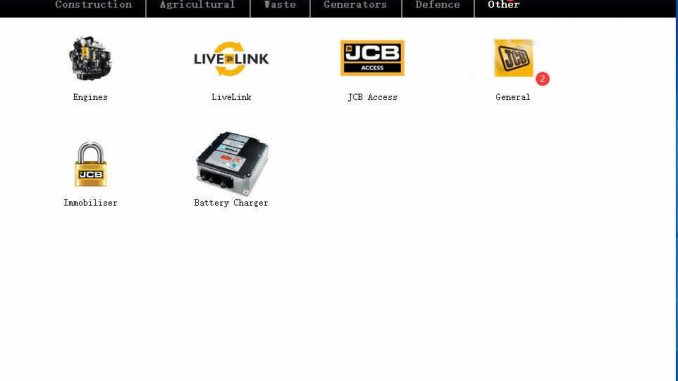
This is a how to guide on JCB ServiceMaster diagnostic tool DLA diagnostic adapter configuration.
Related Contents:
2023 JCB ServiceMaster 4 Free Download for Win 7/Win 8/Win 10
Procedures:
1 Start the Servicemaster software on your laptop computer.
2 Click the ‘Other’ tab.
3 Click on the ‘General’ icon.
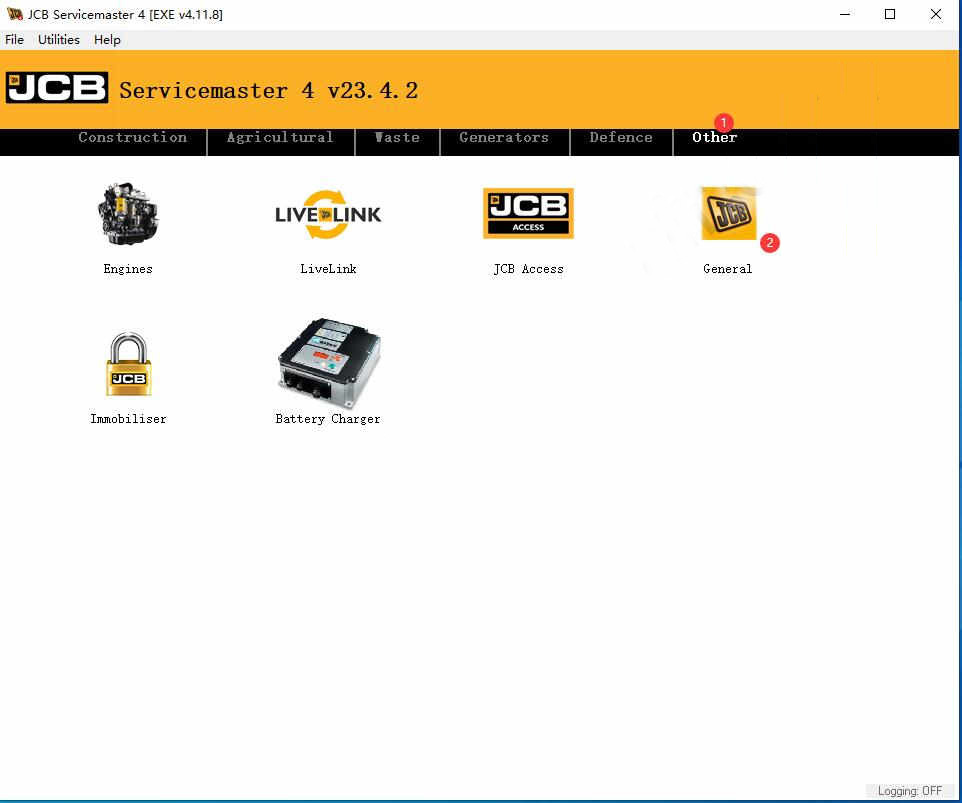
4 Click on the ‘DLA’ icon.
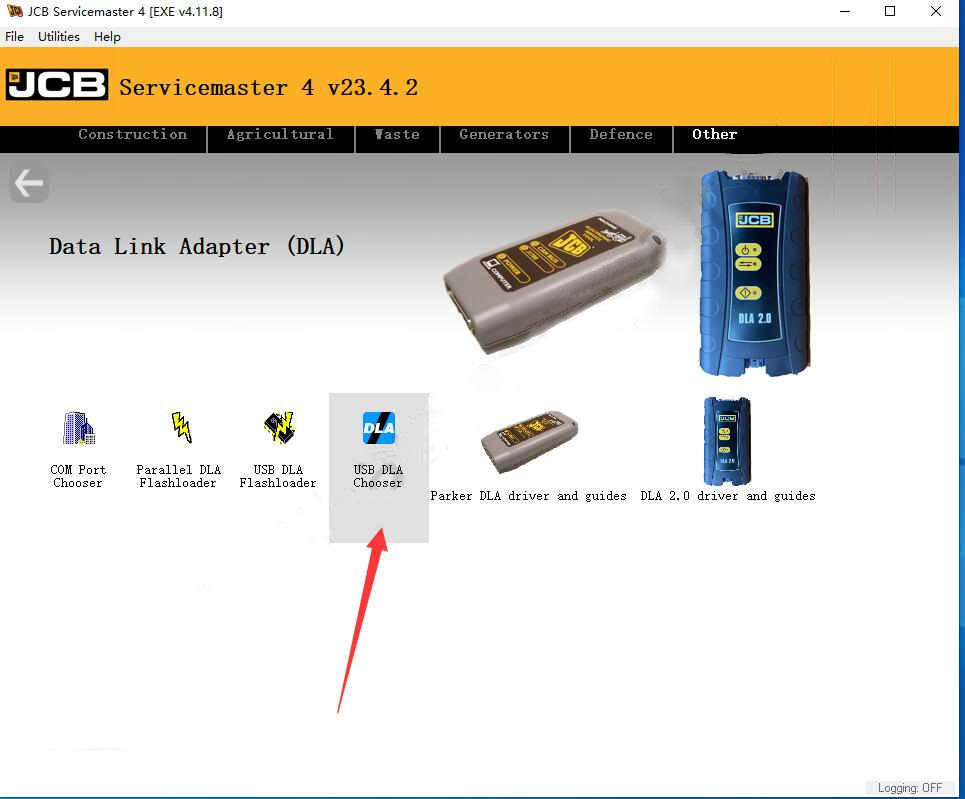
5 Select “USB DLA Chooser”
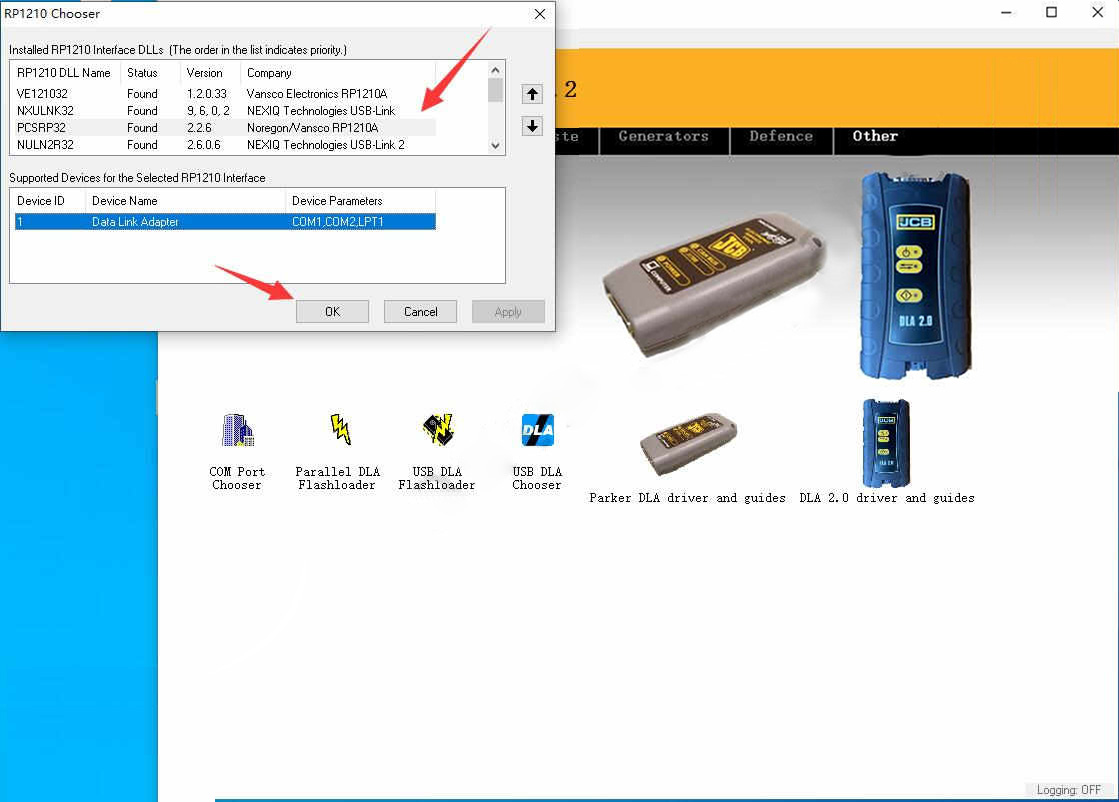
6 Select installed RP1210 interface DLLs (The order in the list indicate priority)
Click “Up” arrow to move your interface to top order
Then click “OK”
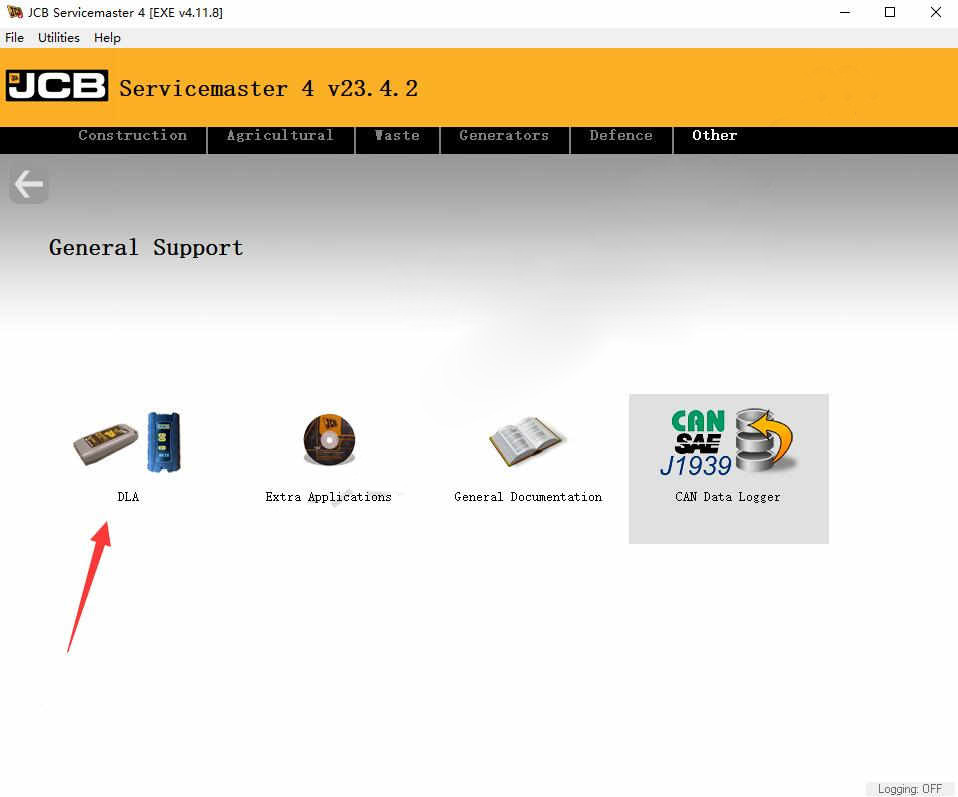
More topics for JCB machine,please refer to:JCB Machine Trouble Repair.
2023年5月30日星期二
Correct operation after Volvo 88890300 Vocom Interface PTT 1.12 software update
Volvo 88890300 Vocom Interface is a diagnostic application that covers the whole repair process through the use of plug-ins. With Volvo 88890300 Vocom Interface you can diagnose, test, calibrate, and program a product (a vehicle, engine, or a machine). Volvo 88890300 Vocom Interface also provides functions for updating the tool, communication with the product, and other external applications. Users can setup plug-ins, user authorizations, and available languages as they want.

For our Volvo 88890300 Vocom Interface we offer PTT 1.12 Or PTT 2.8.150 software version
For PTT 1.12 you should install software yourself , and for PTT2.8.150
version software we will install software well on hard disk
There have customers asked that if he updated the PTT 1.12 version software not working , then how to do next ?
The best way is that you should change the other win7 system re-install the software again , then can use it.
If you want to learn more about Heavy Duty Diagnostic Tools , welcome to contact with us: Service@autonumen.com , or you can check on our store: autonumen.com .Thanks!
2023年5月24日星期三
How to disassemble and assemble New Holland LW 130.B wheel loader rotary feed pump
This post prescribes fuel pipelines(from pumping elements to injectors, bleeding recovery pipes from injectors to pump, LDA pipeline and feed provided by priming pump) shall all be disassembled.
Electrical connection to feed pump shall be disconnected.
Accelerator cable shall be disconnected.
Related Contents:
New Holland Electronic Service Tools (CNH EST 9.8 9.7 8.6 engineering Level) CNH Kit Diagnostic Tool
Notice:
In case feed pump replacement is necessary, this shall be supplied pre-set already as spare part.
On the other hand, in case the pump shall be disassembled and
reassembled later on without being repaired it will be necessary to
pr-set it while it is still assembled to the engine and disassemble it
only afterwards.
The following procedure analyses this second hypothesis since it is the more complex.
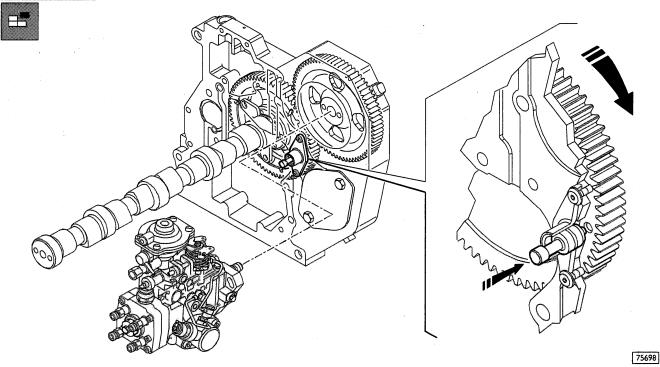
Rotate with caution the flywheel following its own rotation sense to annul the gear slacks and at the same time keep the(→) pin pressed until when this last one is fitting into the port of the camshaft gear.
This way the P15. shall be determined within N.l. cylinder.
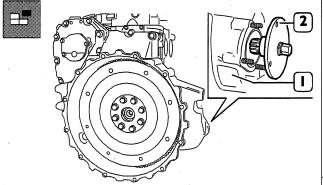
Disassemble the starter from the flywheel box(l) and use the 380000988 tool(2) rotate the flywheel.
Flywheel rotation shall be carried out with extreme caution.The pin charged by excessive shearing stress may get damaged.
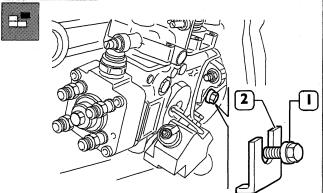
Partially loosen the lateral screw (2) locking the pump shaft and remove the slip washer(2). Absolutely keep the slip washer(it is recommended to fox it with stripe or wire to the pump).
Tighten the lateral screw(1) blocking rotation of the pump shaft.
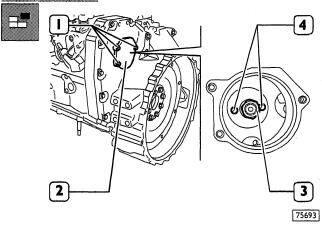
From timing side, remove the cover(2) loosening the screws(I) in order to have access to the union fixing nut (3) to the pump driving gear.
Loosen thefixing nut(3) and remove the relating washer.
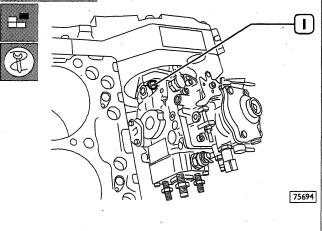
From the pump side, loosen the fixing nuts(1) without removing them in order to enable moving the pump backwards using 380000979 extractor.
Assemble the 380000979 extractor throughout the two threaded ports (4. Figure 97) and withdraw the gear from the pump shaft.
Properly hold the feed pump and loosen completely the fxing nuts.
Withdraw the pump from the studs, together with the gasket.
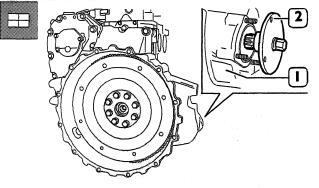
When assembling the feed pump to the engine, it is necessary to meet the PM.S, requirements for the Nl. cylinder.
Use the 380000988 tool(2)n the flywheel box(I) to carry out flywheel rotation and operate using the pin as previously described.
Hold the pump driving gear to avoid interference or crawling during timing gear rotation.
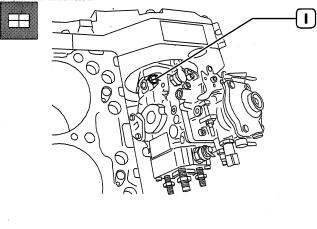
Assemble the pump pre-set in its housing on the engine, fitting the shaft into the gear port(not provided with wrench).
Tighten the fxing nuts(1) locking the pump flange in the slot centre.
The gasket removed during pump disassembly shall not be utilised again.
Always use original spare parts.
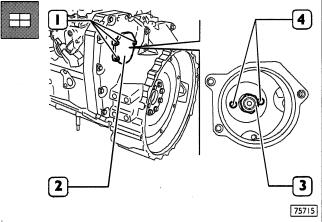
On the timing side, throughout the specially appointed port, fit the washer and screw up the fixing nut(3) to the pump shaft. Lock the nut to the 90-95 Nm couple.
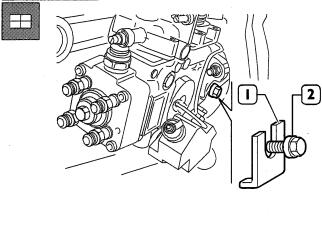
Partially loosen the screw (2) locking the pump shaft rotation and fit the slip washer(1). Tighten the screwfixing above said washer: this way the feed pump shaft is free to rotate.
Assemble the cover(2. Figure 101) including gasket and tighten the screws(I, Figure 10l).
Pull the pin outwards setting the camshaft gear free.
Disassemble the 380000988 tool locking flywheel rotation; place the starter in its housing Connect all pipelines (from pumping elements to injectors, bleeding recovery pipes from injectors to pump, LDA pipeline and feed provided by priming pump).
Connect electrical connections to electro-magnets on the hydraulic head and on KKSB.
In case pump removal has been carried out while the engine was assembled, connect acceleration cable.
If you want to learn more about Heavy Duty Diagnostic Tools , welcome to contact with us: Service@autonumen.com , or you can check on our store: autonumen.com .Thanks!
订阅:
博文 (Atom)